Principles of Network Applications
研究网络应用程序的核心是写出能够运行在不同的端系统和通过网络彼此通信的程序。不需要写在网络核心设备如路由器或链路层交换机上运行的软件。
Network Application Architectures
- 在**客户-服务器体系结构 (client-server architecture)**中,有一个总是打开的主机称为服务器,它服务于来自许多其他称为客户的主机的请求。著名的应用程序包括Web、FTP、Telnet和电子邮件。
- 在一个P2P体系结构(P2P architecture)中,对位于数据中心的专用服务器有最小的(或者没有)依赖。相反,应用程序在间断连接的主机对之间使用直接通信,这些主机对被称为对等方。这些应用包括文件共享(例如BitTorrent)、对等放协助下载加速器(如迅雷)、因特网电话(例如Skype)和IPTV(如迅雷看看)。
Processes Communicating
在操作系统术语中,进行通信的实际上是进程(process)。一个进程可以被认为是运行在端系统中的一个程序。当程序运行在相同的端系统上时,它们使用进程间通信机制相互通信。在不同端系统上的进程,通过跨越计算机网络交换报文(message)而相互通信。
客户与服务器进程
在一对进程之间的通信会话场景中,发起通信(即在该会话开始时发起与其他进程的联系)的进程被标识为客户(client),在会话开始时等待联系的进程是服务器(server)。
进程与计算机网络之间的接口
进程通过一个称为**套接字(socket)**的软件接口向网络发送报文和从网络接收报文。应用程序可以控制套接字在应用层端的一切,但是对该套接字的运输层几片没有控制权。除选择运输层协议与设定几个运输层参数,如最大缓存和最大报文段长度等。
进程寻址
为了标识接受进程的地址,需要定义两种信息,主机的地址和定义在目的主机中的接收进程的标识符。主机友IP地址(IP address)标识。目的地端口号标识进程。
Web服务器用端口号80来标识,邮件服务器进程(使用SMTP协议)用端口号25来标识。
Transport Services Available to Applications
一个运输层协议能够为调用它的应用程序提供什么样的服务呢?从四个方面对应用程序服务要求进行分类:可靠数据传输、吞吐量、定时、安全性.
Transport Services Provided by the Internet
-
TCP服务
TCP服务模型包括面向连接服务和可靠数据传输服务,TCP还提供拥塞控制机制
- 面向连接:客户机/服务器进程间需建立连接。握手过程提示客户和服务器,使它们为大量分组的到来做好准备。在握手阶段后,一个TCP连接(TCP connection)就在两个进程的套接字之间建立了。这条连接是全双工的,即连接双方的进程可以在此连接上同时进行报文收发。
- 可靠的传输:通信进程能够依靠TCP,无差错、按适当顺序交付所有发送的数据。
-
UDP服务
UDP是一种不提供不需要服务的轻量级运输协议,无连接:它不需在两主机间建立连接,提供不可靠的数据传输,UDP协议并不保证该报文将到达接收进程。不仅如此,到达接收进程的报文也可能是乱序到达的。没有包括拥塞控制机制。
- 因特网运输协议所不提供的服务
无论TCP还是UDP都没有提供任何加密机制,TCP的加强版本称为安全套接字层(Secure Sockets Layer, SSL),包括加密、数据完整性和端点鉴别。SSL不是与TCP和UDP在相同层次上的第三种运输协议,**是在应用层上实现的强化。**如果一个应用要使用SSL的服务,需要在该应用程序的客户端和服务端包括SSL代码(利用现有的、高度优化的库和类)。
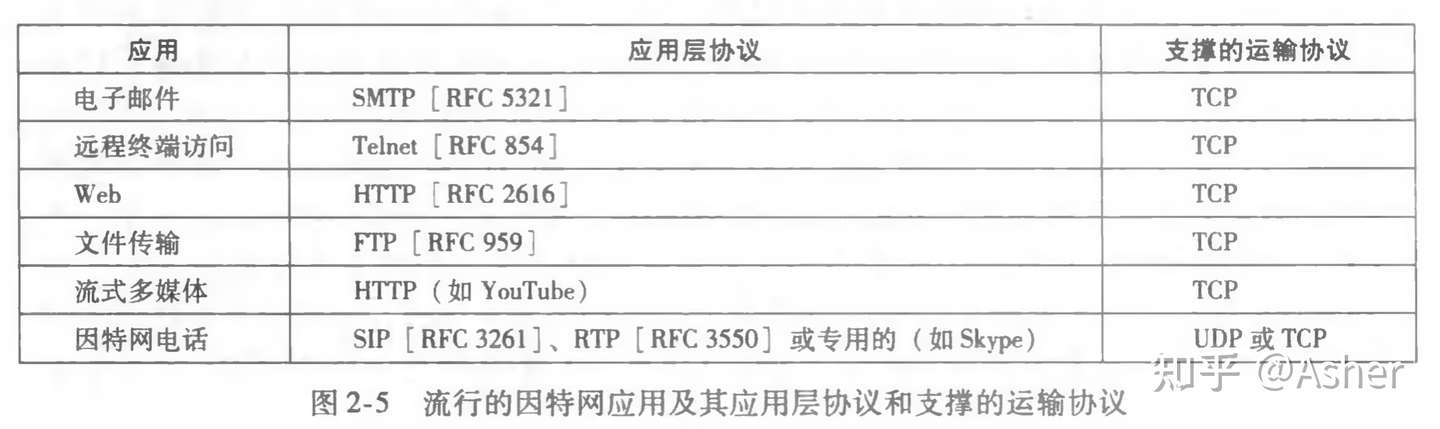
Application-Layer Protocols
应用层协议(application-layer protocol)定义了运行在不同 端系统上的应用程序进程如何相互传递报文
- 公开协议:由RFC定义,Web的应用层协议是HTTP,它定义了在浏览器和Web服务器之间传输的报文格式和序列。用于电子邮件的主要应用层协议就是SMTP
- 私有协议:多数P2P文件共享应用
The Web and HTTP
Overview of HTTP
Web的应用层协议是超文本传输协议(HyperText Transfer Protocol, HTTP),它是Web 的核心,在[RFC 1945]和[RFC 2616]中进行了定义。
- web页面=多个对象组成(对象只是一个文件,如一个html文件,一个图形,一个java小程序或一个视频)。每个对象通过一个对应的URL寻址。
- HTTP使用TCP作为它的支撑运输协议。
- HTTP客户首先发起一个与服务器的TCP连接。一旦连接建立,该浏览器和服务器进程就可以通过套接字接口访问TCP 。
- 一旦客户向它的套接字接口发送了一个请求报文,该报文就脱离了客户控制并进入TCP的控制。 因为TCP协议,一个客户进程发出的每个HTTP请求报文最终能完整地到达服务器
- HTTP服务器并不保存关于客户的任何信息,所以我们说HTTP是一个无状态协议(stateless protocol)
Idempotence(幂等 )
HTTP方法的幂等性是指一次和多次请求某一个资源应该具有同样的副作用。(注意是副作用)
GET http://www.bank.com/account/123456,不会改变资源的状态,不论调用一次还是N次都没有副作用。请注意,这里强调的是一次和N次具有相同的副作用,而不是每次GET的结果相同。GET http://www.news.com/latest-news这个HTTP请求可能会每次得到不同的结果,但它本身并没有产生任何副作用,因而是满足幂等性的。
DELETE方法用于删除资源,有副作用,但它应该满足幂等性。比如:DELETE http://www.forum.com/article/4231,调用一次和N次对系统产生的副作用是相同的,即删掉id为4231的帖子;因此,调用者可以多次调用或刷新页面而不必担心引起错误。
POST所对应的URI并非创建的资源本身,而是资源的接收者。比如:POST http://www.forum.com/articles的语义是在http://www.forum.com/articles下创建一篇帖子,HTTP响应中应包含帖子的创建状态以及帖子的URI。两次相同的POST请求会在服务器端创建两份资源,它们具有不同的URI;所以,POST方法不具备幂等性。
PUT所对应的URI是要创建或更新的资源本身。比如:PUT http://www.forum/articles/4231的语义是创建或更新ID为4231的帖子。对同一URI进行多次PUT的副作用和一次PUT是相同的;因此,PUT方法具有幂等性。
Non-Persistent and Persistent Connections
每个请求/响应对是经一个单独的TCP连接发送,还是所有的请求及其响应经相同的TCP连接发送呢?采用前一种方法,该应用程序被称为使用非持续连接(non-persistent connection); 采用后一种方法,该应用程序被称为使用持续连接(persistent connection) 。
使用持续连接或非持续连接是由应用层决定的(HTTP默认使用的是持续连接)
采用非持续连接的HTTP
|
|
Connection: close 不希望使用持续连接
每个TCP连接只传输一个请求报文和一个响应报文。每次服务器发送响应报文后,会通知该TCP断开该TCP连接。HTTP客户接收响应报文,TCP连接关闭。
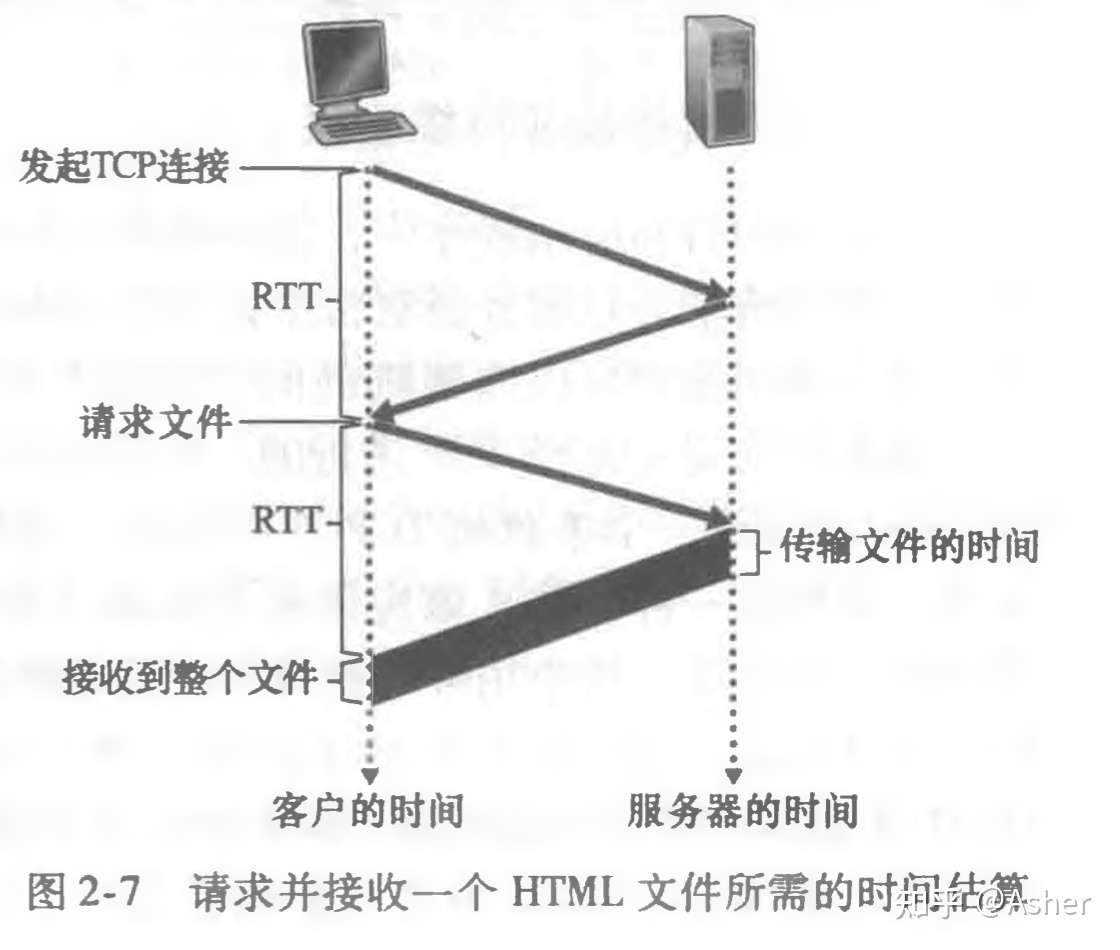
客户向服务器发送一个TCP报文段,服务器用TCP报文段做出响应,客户向服务器返回确认。三次握手中前两个部分所耗费时间占一个RTT。完成了三次握手的前两部分后,客户结合三次握手的第三部分(确认)向该TCP连接发送一个请求报文。一旦请求报文到达服务器,服务器就在服务器就在该TCP连接上发送 HTML文件。TCP三次握手以及时间分析,总计两个往返时间RTT(Round-Trip Time, RTT)+服务器传输Html文件的时间。因此非持续连接是非常低效率的。
非持续连接的两个缺点:
- 要为每个请求的对象建立一个连接,对于每个连接,客户和服务器中都要分配TCP缓冲区和保持TCP变量,给服务器带来严重负担;
- 每个对象都要遭受两倍RTT的交付时延,一个RTT用来创建TCP,另一个RTT用来请求和接受一个对象。
采用持续连接的HTTP
|
|
Connection: Keep-Alive 和 Keep-Alive: timeout=20, max=1000
服务器在发送响应之后保持该TCP连接打开。因此,位于同一台服务器的多个Web页面都可以在单个TCP上进行传输。请求可以一个接一个地发而不必等待未决请求的回答(流水线)。如果一条连接经过一定时间间隔(一个可配置的超时间隔)仍未被使用,HTTP服务器就关闭该连接。
HTTTP的默认模式是使用带流水线的持续连接。
HTTP Message Format
HTTP请求报文
一个典型的http请求报文:
|
|
Host首部行是Web代理高速缓存所要求的。Connection:close高速浏览器不希望使用持续连接,服务器发送完请求对象后就关闭连接。
User-agent服务器可以为不同类型的用户发送相同对象的不同的版本。
下图是请求报文的通用格式

首部行后面的 实体体(Entity body),在使用 POST 方法时存储用户提交的表单。
- 请求头Host字段,一个服务器多个网站
- 长链接
- 文件断点续传
- 身份认证,状态管理,Cache缓存
HTTP Method
同的方法规定了不同的操作指定的资源方式。服务端也会根据不同的请求方法做不同的响应。
GET和POST除了语义之外没有区别:
- 现代的Web Server都是支持GET中包含BODY这样的请求。虽然这种请求不可能从浏览器发出,但是现在的Web Server又不是只给浏览器用,已经完全地超出了HTML服务器的范畴了。
- HTTP头和Body都没有长度的要求。而对于URL长度上的限制,有两方面的原因造成:浏览器和服务器。API网关一般会限制报文大小
- 安全不安全和GET、POST没有关系
-
GET
GET请求会显示请求指定的资源。一般来说GET方法应该只用于数据的读取,而不应当用于会产生副作用的非幂等的操作中。
GET会方法请求指定的页面信息,并返回响应主体,GET被认为是不安全的方法,因为GET方法会被网络蜘蛛等任意的访问。
-
HEAD
HEAD方法与GET方法一样,都是向服务器发出指定资源的请求。但是,服务器在响应HEAD请求时不会回传资源的内容部分,即:响应主体。这样,我们可以不传输全部内容的情况下,就可以获取服务器的响应头信息。HEAD方法常被用于客户端查看服务器的性能。
-
POST
POST请求会 向指定资源提交数据,请求服务器进行处理,如:表单数据提交、文件上传等,请求数据会被包含在请求体中。POST方法是非幂等的方法,因为这个请求可能会创建新的资源或/和修改现有资源。
-
PUT
PUT请求会身向指定资源位置上传其最新内容,PUT方法是幂等的方法。通过该方法客户端可以将指定资源的最新数据传送给服务器取代指定的资源的内容。
-
DELETE
DELETE请求用于请求服务器删除所请求URI(统一资源标识符,Uniform Resource Identifier)所标识的资源。DELETE请求后指定资源会被删除,DELETE方法也是幂等的。
-
CONNECT
CONNECT方法是HTTP/1.1协议预留的,能够将连接改为管道方式的代理服务器。通常用于SSL加密服务器的链接与非加密的HTTP代理服务器的通信。
-
OPTIONS
OPTIONS请求与HEAD类似,一般也是用于客户端查看服务器的性能。 这个方法会请求服务器返回该资源所支持的所有HTTP请求方法,该方法会用’*’来代替资源名称,向服务器发送OPTIONS请求,可以测试服务器功能是否正常。JavaScript的XMLHttpRequest对象进行CORS跨域资源共享时,就是使用OPTIONS方法发送嗅探请求,以判断是否有对指定资源的访问权限。 允许
-
TRACE
TRACE请求服务器回显其收到的请求信息,该方法主要用于HTTP请求的测试或诊断。
HTTP/1.1之后增加的方法
在HTTP/1.1标准制定之后,又陆续扩展了一些方法。其中使用中较多的是 PATCH 方法:
-
PATCH
PATCH方法出现的较晚,它在2010年的RFC 5789标准中被定义。PATCH请求与PUT请求类似,同样用于资源的更新。二者有以下两点不同:
但PATCH一般用于资源的部分更新,而PUT一般用于资源的整体更新。 当资源不存在时,PATCH会创建一个新的资源,而PUT只会对已在资源进行更新。
HTTP响应报文
http响应报文由三部分组成:一个初始状态行(status line),之后有6个首部行(header line),然后是实体体(entity body)
|
|
服务器永Connection: close首部行高速客户,发送完报文后就关闭该TCP连接。Date首部行指的是服务器从文件系统中检索到对象,插入响应报文的时间,而不是对象创建或最后修改的时间。
Last-Modified首部行指示了对象创建或者最后修改的日期和时间,对既可能在本地客户也可能在网络缓存服务器上的对象缓存来说非常重要。
一个HTTP响应报文的通用格式

常见状态码:
| 状态码 | 定义 |
|---|---|
| 1xx 报告 | 接收到请求,继续进程 |
| 2xx 成功 | 步骤成功接收,被理解,并被接受 |
| 3xx 重定向 | 为了完成请求,必须采取进一步措施 |
| 4xx 客户端出错 | 请求包括错的顺序或不能完成 |
| 5xx 服务器出错 | 服务器无法完成显然有效的请求 |
-
200 OK
-
201 Created
-
204 No Content
-
301 Moved Permanently
-
302 Found
-
304 Not Modified
这用于缓存目的。它告诉客户端尚未修改响应,因此客户端可以继续使用相同的缓存版本的响应。
-
401 Unauthorized
-
400 Bad Request
-
403 Forbidden
-
404 Not Found
-
405 Method Not Allowed
-
500 Internal Server Error
-
502 Bad Gateway
-
505 HTTP Version Not Supported
User-Server Interaction: Cookies
HTTP服务器是无状态化的,这简化了服务器的设计,这让工程师可以去开发能同时处理大量数据的高性能服务器。但是有时Web站点希望能去识别用户,为此HTTP使用了cookie来进行用户跟踪。
Cookies are mainly used for three purposes:
-
Session management
Logins, shopping carts, game scores, or anything else the server should remember
-
Personalization
User preferences, themes, and other settings
-
Tracking
Recording and analyzing user behavior
cookie技术有4个组件:
- 在 HTTP 响应报文中的一个 cookie 首部行;
- 在 HTTP 请求报文中的一个 cookie 首部行;
- 在用户端系统中保留有一个 cookie 文件,并由用户的浏览器进行管理;
- 位于 Web 站点的一个后端数据库。
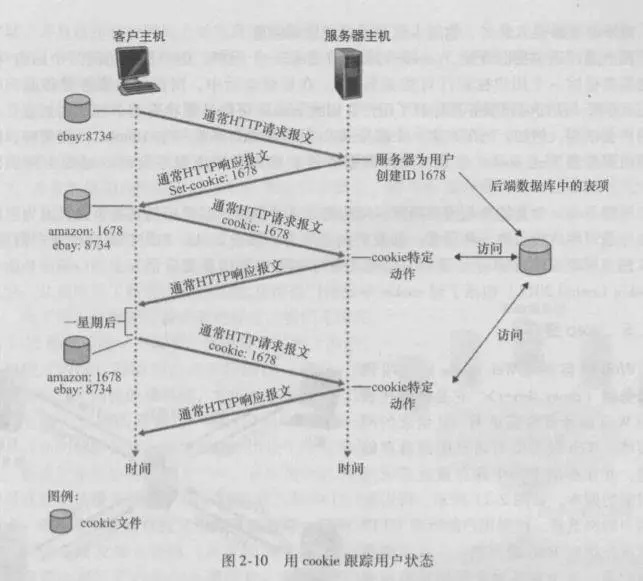
cookie可以用于标识一个用户,cookie可以在无状态的HTTP之上建立一个用户会话层。
站点不必知道用户身份,可以记录按什么顺序,在什么时间,访问了哪些页面。能够根据过去访问的网页对用户推荐产品。
Cookie和Session
- 会话是存储用户信息的服务器端文件,而Cookie是包含本地计算机上的用户信息的客户端文件。
- 会话依赖于Cookie,而Cookie不依赖于Session。
- 当用户关闭浏览器或从应用程序注销时,会话结束,而Cookies在设置的时间到期。
- 会话可以存储用户想要的尽可能多的数据,而Cookies的大小限制为4KB。
Web Caching
Web缓存器(Web cache)也叫代理服务器(proxy server),它是能够代表初始Web服务器来满足HTTP请求的网络实体.Web缓存器有自己的磁盘存储空间,并在存储空间中保存最近请求过的对象的副本。
客户对过Web缓存器请求对象:
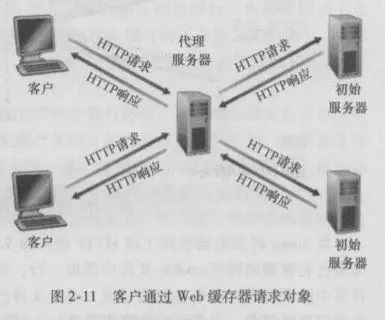
- 浏览器建立一个到Web缓存器的TCP连接,并向Web缓存器中的对象发送一个HTTP请求。
- Web缓存器进行检查,看看本地是否缓存了该对象副本。如果有,Web缓存器就向客户浏览器用HTTP响应报文返回该对象。
- 如果web缓存器没有该对象,就打开一个与该对象的初始服务器的TCP连接,Web缓存器向初始服务器的TCP连接上发送一个HTTP请求。
- Web缓存器收到该对象,本地存储空间存储副本,并向客户浏览器利用现有TCP连接发送HTTP响应包含该副本
Web缓存器既是服务器又是客户。当它接收浏览器的请求并发回响应 时,它是一个服务器。当它向初始服务器发出请求并接收响应时,它是一个客户。
Web缓存器通常由ISP购买并安装。Web缓存器可以减少成本,降低响应时间。
通过使用内容分发网络(Content Distribution Network, CDN),Web缓存服务器正在因特网中发挥着越来越重要的作用。
The Conditional GET
那么Web缓存器什么时候才会去刷新缓存下来的页面,以保存提供给客户是最新的对象呢?
HTTP协议有一处机制—–条件GET(conditional GET)方法。
若同时满足以下两点的则称为 条件 GET 方法:
-
请求报文使用 GET 方法。
-
请求报文中包含一个 If-Modified-Since: 首部行。
原始服务器向Web缓存器中返回HTTP响应时包含Last-Modified首部行,缓存器在存储该对象的同事也存储了最后修改日期。
Web缓存器向原始Web服务器发送请求:
|
|
Web服务器向缓存器发送一个响应报文
|
|
“Not Modified”,没有在响应报文中包含所请求的对象,高速缓存器可以使用该对象,向请求浏览器转发代理缓存器缓存的对象副本。
HTTPS
HTTPS (Hypertext Transfer Protocol Secure) is a secure version of the HTTP protocol that uses the SSL/TLS protocol for encryption and authentication.
How is HTTPS different from HTTP?
- HTTPS adds encryption (加密), authentication (认证), and integrity (完整性) to the HTTP protocol:
- 由于HTTP最初是作为纯文本协议设计的,因此容易受到窃听和中间人攻击。通过包括SSL/TLS加密,HTTPS可以防止第三方拦截和读取通过Internet发送的数据。
- 与HTTP不同,HTTPS包括通过SSL / TLS协议进行的可靠身份验证。
- HTTPS Web服务器发送到浏览器的每个文档(例如网页,图像或JavaScript文件)都包含数字签名,网络浏览器可以使用该数字签名来确定文档没有被第三方或否则在运输过程中损坏。
HTTPS message sequence diagram with detailed TLS handshaking steps

- **“客户端问候”消息:**客户端通过向服务器发送“问候”消息来发起握手。该消息将包括客户端支持的TLS版本,支持的密码套件以及称为“客户端随机”的随机字节字符串。
- **“服务器问候”消息:**作为对客户端问候消息的答复,服务器发送一条消息,其中包含服务器的SSL证书,服务器选择的密码套件和“服务器随机”,这是服务器生成的另一个随机字节字符串。
- **身份验证:**客户端使用颁发它的证书颁发机构验证服务器的SSL证书。这确认服务器是它所说的身份,并且该客户端正在与该域的实际所有者进行交互。
- **premaster机密:**客户端再发送一个随机的字节串,即“ premaster机密”。Premaster机密使用公钥加密,并且只能由服务器使用私钥解密。(客户端从服务器的SSL证书获取公共密钥。)
- **使用的私钥:**服务器解密premaster机密。
- **创建的会话密钥:**客户端和服务器均根据客户端随机数,服务器随机数和premaster机密生成会话密钥。他们应该得出相同的结果。
- **客户端已准备就绪:**客户端发送“完成”消息,该消息已用会话密钥加密。
- **服务器已准备就绪:**服务器发送了一条用会话密钥加密的“完成”消息。
- **实现了安全的对称加密:**握手已完成,并且使用会话密钥继续进行通信。
How the client verifies the server’s SSL certificate
使用发行者证书发行者的公钥解开服务器的证书,查看是否和服务器的实际域名相匹配;
TLS Cryptographic Algorithms
-
All TLS handshakes make use of asymmetric encryption (the public and private key) . which means that they use two different keys: a public key for encryption and a private key for decryption.
RSA (Rivest-Shamir-Adleman), DH (Diffie-Hellman),
-
Generate session keys in order to use symmetric encryption after the handshake is complete.
All the bulk cipher algorithms are symmetric algorithms using the same key for encryption and decryption.
AES, RC4
HTTP2
Binary framing layer (二进制框架层)
At the core of all performance enhancements of HTTP/2 is the new binary framing layer, both client and server must use the new binary encoding mechanism to understand each other.

Streams, messages, and frames

HTTP/2 breaks down the HTTP protocol communication into an exchange of binary-encoded frames, which are then mapped to messages that belong to a particular stream, all of which are multiplexed within a single TCP connection.
Request and response multiplexing

使用HTTP / 1.x,如果客户端希望发出多个并行请求以提高性能,则必须使用多个TCP连接。此行为是HTTP / 1.x传递模型的直接结果,该模型确保每个连接一次只能传递一个响应(响应队列)。更糟糕的是,这还会导致行头阻塞和底层TCP连接的低效使用。
HTTP / 2中新的二进制框架层消除了这些限制,并通过允许客户端和服务器将HTTP消息分解为独立的帧,进行交织,然后在另一端重新组装,从而实现了完整的请求和响应多路复用。
Server push
Another powerful new feature of HTTP/2 is the ability of the server to send multiple responses for a single client request. That is, in addition to the response to the original request, the server can push additional resources to the client without the client having to request each one explicitly.

DNS–The Internet’s Directory Service
Services Provided by DNS
Overview of How DNS Works
DNS Records and Messages
Peer-to-Peer Applications
P2P File Distribution
Distributed Hash Tables (DHTs)
Case Study: P2P Internet Telephony with Skype
Socket Programming: Creating Network Applications
网络应用程序有两类。一类是实现在协议标准(如一个RFC或某种其他标准文档)中所定义的操作;这样的应用程序又称为“开放”的,因为定义其操作的这些规则人所共知。对于这样的实现,客户程序和服务器程序必须遵守由该RFC所规定的规则。如果一个开发者编写客户程序的代码,另一个开发者编写服务器程序的代码,并且两者都完全遵从该RFC的各种规则,那么这两个程序将能够交互操作。
另一类网络应用程序是专用的网络应用程序。在这种情况下,由客户和服务器程序应用的应用层协议没有公开发布在某RFC中或其他地方。某单独的开发者(或开发团队)创建了客户和服务器程序,并且该开发者用他的代码完全控制程序的功能。但是因为这些代码并没有实现一个开放的协议,其他独立的开发者将不能开发出和该应用程序交互的代码。
在研发阶段,开发者必须最先做的一个决定是,应用程序是运行在TCP上还是运行在UDP上。前面讲过TCP是面向连接的,并且为两个端系统之间的数据流动提供可靠的字节流通道。UDP是无连接的,从一个端系统向另一个端系统发送独立的数据分组,不对交付提供任何保证。前面也讲过当客户或服务器程序实现了一个由某RFC定义的协议,它应当使用与该协议关联的周知端口号;与之相反,当研发一个专用应用程序,研发者必须注意避免使用这样的周知端口号。
Socket Programming with UDP
应用程序开发者在套接字的应用层一侧可以控制所有东西;然而,它几乎无法控制运输层一侧。
在发送进程能够将数据分组推出套接字之门之前,当使用UDP时,必须先将目的地址附在该分组之上。在该分组传过发送方的套接字之后,因特网将使用该目的地址通过因特网为该分组选路到接收进程的套接字。当分组到达接收套接字时,接收进程将通过该套接字取回分组,进而检查分组的内容并采取适当的动作。
当生成一个套接字时,就为它分配一个称为端口号(port number)的标识符。因此,如你所期待的,分组的目的地址也包括该套接字的端口号。
归纳起来,发送进程为分组附上的目的地址是由目的主机的IP地址和目的地套接字的端口号组成的。此外,如我们很快将看到的那样,发送方的源地址也是由源主机的IP地址和源套接字的端口号组成,该源地址也要附在分组之上。然而,将源地址附在分组之上通常并不是由UDP应用程序代码所为,而是由底层操作系统自动完成的。
下显示了客户和服务器的主要与套接字相关的活动,两者通过UDP运输服务进行通信。
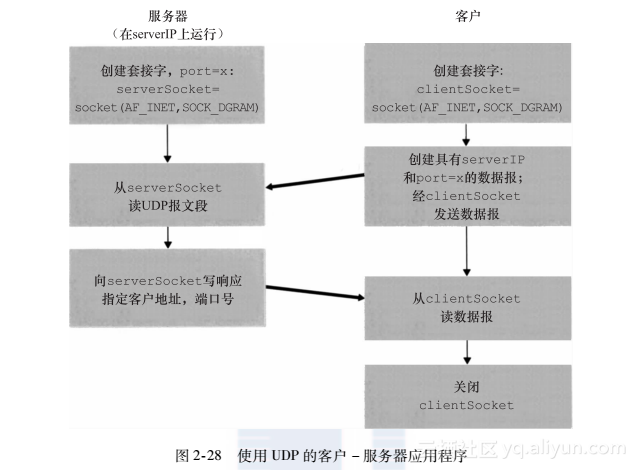
客户程序被称为UDPClient.py,服务器程序被称为UDPServer.py。为了强调关键问题,我们有意提供最少的代码。“好代码”无疑将具有一些更为辅助性的代码行,特别是用于处理出现差错的情况。
UDPClient.py
下面是该应用程序客户端的代码:
|
|
UDPServer.py
现在来看看这个应用程序的服务器端:
|
|
为了测试这对程序,在服务器主机上执行编译的服务器程序UDPServer.py。这在服务器上创建了一个进程,等待着某个客户与之联系。然后,保证在UDPClient.py中包括适当的服务器主机名或IP地址,在客户主机上执行编译的客户器程序UDPClient.py。这在客户上创建了一个进程。最后,在客户上使用应用程序,键入一个句子并以回车结束。
Socket Programming with TCP
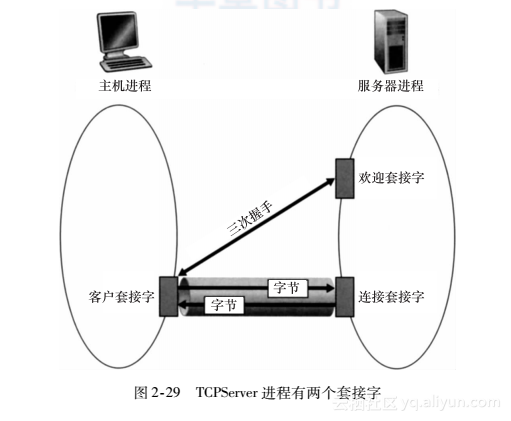
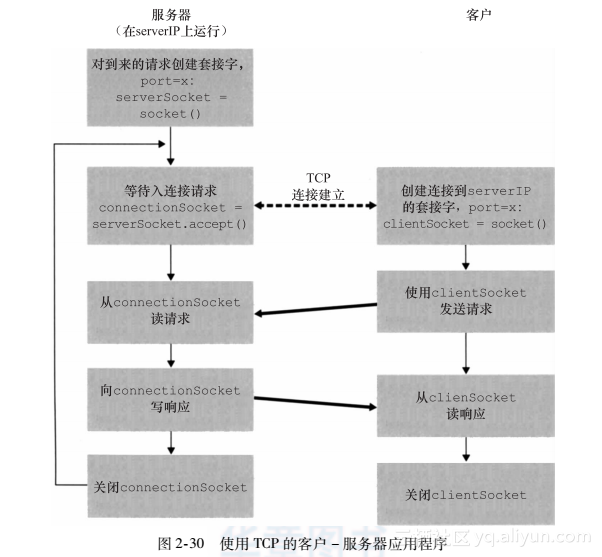
与UDP不同,TCP是一个面向连接的协议。这意味着在客户和服务器能够开始互相发送数据之前,它们先要握手和创建一个TCP连接。TCP连接的一端与客户套接字相联系,另一端与服务器套接字相联系。当创建该TCP连接时,我们将其与客户套接字地址(IP地址和端口号)和服务器套接字地址(IP地址和端口号)关联起来。使用创建的TCP连接,当一侧要向另一侧发送数据时,它只需经过其套接字将数据丢给TCP连接。这与UDP不同,UDP服务器在将分组丢进套接字之前必须为其附上一个目的地地址。 现在我们仔细观察一下TCP中客户程序和服务器程序的交互。客户具有向服务器发起接触的任务。服务器为了能够对客户的初始接触做出反应,服务器必须已经准备好。这意味着两件事。第一,与在UDP中的情况一样,TCP服务器在客户试图发起接触前必须作为进程运行起来。第二,服务器程序必须具有一扇特殊的门,更精确地说是一个特殊的套接字,该门欢迎来自运行在任意主机上的客户进程的某些初始接触。使用房子/门来比喻进程/套接字,有时我们将客户的初始接触称为“敲欢迎之门”。 随着服务器进程的运行,客户进程能够向服务器发起一个TCP连接。这是由客户程序通过创建一个TCP套接字完成的。当该客户生成其TCP套接字时,它指定了服务器中的欢迎套接字的地址,即服务器主机的IP地址及其套接字的端口号。生成其套接字后,该客户发起了一个三次握手并创建与服务器的一个TCP连接。发生在运输层的三次握手,对于客户和服务器程序是完全透明的。 在三次握手期间,客户进程敲服务器进程的欢迎之门。当该服务器“听”到敲门时,它将生成一扇新门(更精确地讲是一个新套接字),它专门用于特定的客户。在我们下面的例子中,欢迎之门是一个我们称为serverSocket的TCP套接字对象;它专门对客户进行连接的新生成的套接字,称为连接套接字(connection Socket)。初次遇到TCP套接字的学生有时会混淆欢迎套接字(这是所有要与服务器通信的客户的起始接触点)和每个新生成的服务器侧的连接套接字(这是随后为与每个客户通信而生成的套接字)。 从应用程序的观点来看,客户套接字和服务器连接套接字直接通过一根管道连接。如图2-29所示,客户进程可以向它的套接字发送任意字节,并且TCP保证服务器进程能够按发送的顺序接收(通过连接套接字)每个字节。TCP因此在客户和服务器进程之间提供了可靠服务。此外,就像人们可以从同一扇门进和出一样,客户进程不仅能向它的套接字发送字节,也能从中接收字节;类似地,服务器进程不仅从它的连接套接字接收字节,也能向其发送字节。
下图显示了客户和服务器的主要与套接字相关的活动,两者通过TCP运输服务进行通信。
TCPClient.py
这里给出了应用程序客户端的代码:
|
|
TCPServer.py
现在我们看一下服务器程序
|
|
在两台单独的主机上运行这两个程序,也可以修改它们以达到稍微不同的目的。你应当将前面两个UDP程序与这两个TCP程序进行比较,观察它们的不同之处。
Socket Programming Assignments
The companion Web site includes six socket programming assignments. The first four assignments are summarized below. The fifth assignment makes use of the ICMP protocol and is summarized at the end of Chapter 4. The sixth assignment employs multimedia protocols and is summarized at the end of Chapter 7. It is highly recommended that students complete several, if not all, of these assignments. Students can find full details of these assignments, as well as important snippets of the Python code, at the Web site http://www.awl.com/kurose-ross.
Assignment 1: Web Server
In this assignment, you will develop a simple Web server in Python that is capable of processing only one request. Specifically, your Web server will (i) create a con- nection socket when contacted by a client (browser); (ii) receive the HTTP request from this connection; (iii) parse the request to determine the specific file being requested; (iv) get the requested file from the server’s file system; (v) create an HTTP response message consisting of the requested file preceded by header lines; and (vi) send the response over the TCP connection to the requesting browser. If a browser requests a file that is not present in your server, your server should return a “404 Not Found” error message.
In the companion Web site, we provide the skeleton code for your server. Your job is to complete the code, run your server, and then test your server by sending requests from browsers running on different hosts. If you run your server on a host that already has a Web server running on it, then you should use a different port than port 80 for your Web server.
Assignment 2: UDP Pinger
In this programming assignment, you will write a client ping program in Python. Your client will send a simple ping message to a server, receive a corresponding pong message back from the server, and determine the delay between when the client sent the ping message and received the pong message. This delay is called the Round Trip Time (RTT). The functionality provided by the client and server is similar to the functionality provided by standard ping program available in modern operating systems. However, standard ping programs use the Internet Control Mes- sage Protocol (ICMP) (which we will study in Chapter 4). Here we will create a nonstandard (but simple!) UDP-based ping program. Your ping program is to send 10 ping messages to the target server over UDP. For each message, your client is to determine and print the RTT when the correspon- ding pong message is returned. Because UDP is an unreliable protocol, a packet sent by the client or server may be lost. For this reason, the client cannot wait indefinitely for a reply to a ping message. You should have the client wait up to one second for a reply from the server; if no reply is received, the client should assume that the packet was lost and print a message accordingly.
In this assignment, you will be given the complete code for the server (avail- able in the companion Web site). Your job is to write the client code, which will be very similar to the server code. It is recommended that you first study carefully the server code. You can then write your client code, liberally cutting and pasting lines from the server code.
Assignment 3: Mail Client
The goal of this programming assignment is to create a simple mail client that sends email to any recipient. Your client will need to establish a TCP connection with a mail server (e.g., a Google mail server), dialogue with the mail server using the SMTP protocol, send an email message to a recipient (e.g., your friend) via the mail server, and finally close the TCP connection with the mail server.
For this assignment, the companion Web site provides the skeleton code for your client. Your job is to complete the code and test your client by sending email to different user accounts. You may also try sending through different servers (for example, through a Google mail server and through your university mail server).
Assignment 4: Multi-Threaded Web Proxy
In this assignment, you will develop a Web proxy. When your proxy receives an HTTP request for an object from a browser, it generates a new HTTP request for the same object and sends it to the origin server. When the proxy receives the corresponding HTTP response with the object from the origin server, it creates a new HTTP response, including the object, and sends it to the client. This proxy will be multi-threaded, so that it will be able to handle multiple requests at the same time.
For this assignment, the companion Web site provides the skeleton code for the proxy server. Your job is to complete the code, and then test it by having different browsers request Web objects via your proxy.
Wireshark Lab: HTTP
In this lab, we’ll explore several aspects of the HTTP protocol: the basic GET/response interaction, HTTP message formats, retrieving large HTML files, retrieving HTML files with embedded objects, and HTTP authentication and security.
The Basic HTTP GET/response interaction
Let’s begin our exploration of HTTP by downloading a very simple HTML file - one that is very short, and contains no embedded objects. Do the following:
- Start up your web browser.
- Start up the Wireshark packet sniffer, as described in the Introductory lab (but don’t yet begin packet capture). Enter “http” (just the letters, not the quotation marks) in the display-filter-specification window, so that only captured HTTP messages will be displayed later in the packet-listing window. (We’re only interested in the HTTP protocol here, and don’t want to see the clutter of all captured packets).
- Wait a bit more than one minute (we’ll see why shortly), and then begin Wireshark packet capture.
- Enter the following to your browser http://gaia.cs.umass.edu/wireshark-labs/HTTP-wireshark-file1.html Your browser should display the very simple, one-line HTML file.
- Stop Wireshark packet capture.
Your Wireshark window should look similar to the window shown in Figure 1. If you are unable to run Wireshark on a live network connection, you can download a packet trace that was created when the steps above were followed.
Figure 1: Wireshark Display after http://gaia.cs.umass.edu/wireshark-labs/ HTTPwireshark-file1.html has been retrieved by your browser
The example in Figure 1 shows in the packet-listing window that two HTTP messages were captured: the GET message (from your browser to the gaia.cs.umass.edu web server) and the response message from the server to your browser. The packet-contents window shows details of the selected message (in this case the HTTP OK message, which is highlighted in the packet-listing window). Recall that since the HTTP message was carried inside a TCP segment, which was carried inside an IP datagram, which was carried within an Ethernet frame, Wireshark displays the Frame, Ethernet, IP, and TCP packet information as well. We want to minimize the amount of non-HTTP data displayed (we’re interested in HTTP here, and will be investigating these other protocols is later labs), so make sure the boxes at the far left of the Frame, Ethernet, IP and TCP information have a plus sign or a right-pointing triangle (which means there is hidden, undisplayed information), and the HTTP line has a minus sign or a down-pointing triangle (which means that all information about the HTTP message is displayed).
Download the zip file http://gaia.cs.umass.edu/wireshark-labs/wireshark-traces.zip and extract the file http-ethereal-trace-1. The traces in this zip file were collected by Wireshark running on one of the author’s computers, while performing the steps indicated in the Wireshark lab. Once you have downloaded the trace, you can load it into Wireshark and view the trace using the File pull down menu, choosing Open, and then selecting the http-ethereal-trace-1 trace file. The resulting display should look similar to Figure 1. (The Wireshark user interface displays just a bit differently on different operating systems, and in different versions of Wireshark).
(Note: You should ignore any HTTP GET and response for favicon.ico. If you see a reference to this file, it is your browser automatically asking the server if it (the server) has a small icon file that should be displayed next to the displayed URL in your browser. We’ll ignore references to this pesky file in this lab.).
By looking at the information in the HTTP GET and response messages, answer the following questions. When answering the following questions, you should print out the GET and response messages (see the introductory Wireshark lab for an explanation of how to do this) and indicate where in the message you’ve found the information that answers the following questions. When you hand in your assignment, annotate the output so that it’s clear where in the output you’re getting the information for your answer (e.g., for our classes, we ask that students markup paper copies with a pen, or annotate electronic copies with text in a colored font).
- Is your browser running HTTP version 1.0 or 1.1? What version of HTTP is the server running?
- What languages (if any) does your browser indicate that it can accept to the server?
- What is the IP address of your computer? Of the gaia.cs.umass.edu server?
- What is the status code returned from the server to your browser?
- When was the HTML file that you are retrieving last modified at the server?R
- How many bytes of content are being returned to your browser?
- By inspecting the raw data in the packet content window, do you see any headers within the data that are not displayed in the packet-listing window? If so, name one.
In your answer to question 5 above, you might have been surprised to find that the document you just retrieved was last modified within a minute before you downloaded the document. That’s because (for this particular file), the gaia.cs.umass.edu server is setting the file’s last-modified time to be the current time, and is doing so once per minute. Thus, if you wait a minute between accesses, the file will appear to have been recently modified, and hence your browser will download a “new” copy of the document.
The HTTP CONDITIONAL GET/response interaction
Recall from Section 2.2.5 of the text, that most web browsers perform object caching and thus perform a conditional GET when retrieving an HTTP object. Before performing the steps below, make sure your browser’s cache is empty. (To do this under Firefox, select Tools->Clear Recent History and check the Cache box, or for Internet Explorer, select Tools->Internet Options->Delete File; these actions will remove cached files from your browser’s cache.) Now do the following:
- Start up your web browser, and make sure your browser’s cache is cleared, as discussed above.
- Start up the Wireshark packet sniffer
- Enter the following URL into your browser http://gaia.cs.umass.edu/wireshark-labs/HTTP-wireshark-file2.html Your browser should display a very simple five-line HTML file.
- Quickly enter the same URL into your browser again (or simply select the refresh button on your browser)
- Stop Wireshark packet capture, and enter “http” in the display-filter-specification window, so that only captured HTTP messages will be displayed later in the packet-listing window.
- (Note: If you are unable to run Wireshark on a live network connection, you can use the http-ethereal-trace-2 packet trace to answer the questions below; see footnote 1. This trace file was gathered while performing the steps above on one of the author’s computers.)
Answer the following questions:
- Inspect the contents of the first HTTP GET request from your browser to the server. Do you see an “IF-MODIFIED-SINCE” line in the HTTP GET?
- Inspect the contents of the server response. Did the server explicitly return the contents of the file? How can you tell?
- Now inspect the contents of the second HTTP GET request from your browser to the server. Do you see an “IF-MODIFIED-SINCE:” line in the HTTP GET? If so, what information follows the “IF-MODIFIED-SINCE:” header?
- What is the HTTP status code and phrase returned from the server in response to this second HTTP GET? Did the server explicitly return the contents of the file? Explain.
Retrieving Long Documents
In our examples thus far, the documents retrieved have been simple and short HTML files. Let’s next see what happens when we download a long HTML file. Do the following:
- Start up your web browser, and make sure your browser’s cache is cleared, as discussed above.
- Start up the Wireshark packet sniffer
- Enter the following URL into your browser http://gaia.cs.umass.edu/wireshark-labs/HTTP-wireshark-file3.html Your browser should display the rather lengthy US Bill of Rights.
- Stop Wireshark packet capture, and enter “http” in the display-filter-specification window, so that only captured HTTP messages will be displayed.
- (Note: If you are unable to run Wireshark on a live network connection, you can use the http-ethereal-trace-3 packet trace to answer the questions below; see footnote 1. This trace file was gathered while performing the steps above on one of the author’s computers.)
In the packet-listing window, you should see your HTTP GET message, followed by a multiple-packet TCP response to your HTTP GET request. This multiple-packet response deserves a bit of explanation. Recall from Section 2.2 (see Figure 2.9 in the text) that the HTTP response message consists of a status line, followed by header lines, followed by a blank line, followed by the entity body. In the case of our HTTP GET, the entity body in the response is the entire requested HTML file. In our case here, the HTML file is rather long, and at 4500 bytes is too large to fit in one TCP packet. The single HTTP response message is thus broken into several pieces by TCP, with each piece being contained within a separate TCP segment (see Figure 1.24 in the text). In recent versions of Wireshark, Wireshark indicates each TCP segment as a separate packet, and the fact that the single HTTP response was fragmented across multiple TCP packets is indicated by the “TCP segment of a reassembled PDU” in the Info column of the Wireshark display. Earlier versions of Wireshark used the “Continuation” phrase to indicated that the entire content of an HTTP message was broken across multiple TCP segments.. We stress here that there is no “Continuation” message in HTTP!
Answer the following questions:
- How many HTTP GET request messages did your browser send? Which packet number in the trace contains the GET message for the Bill or Rights?
- Which packet number in the trace contains the status code and phrase associated with the response to the HTTP GET request?
- What is the status code and phrase in the response?
- How many data-containing TCP segments were needed to carry the single HTTP response and the text of the Bill of Rights?
HTML Documents with Embedded Objects
Now that we’ve seen how Wireshark displays the captured packet traffic for large HTML files, we can look at what happens when your browser downloads a file with embedded objects, i.e., a file that includes other objects (in the example below, image files) that are stored on another server(s).
Do the following:
- Start up your web browser, and make sure your browser’s cache is cleared, as discussed above.
- Start up the Wireshark packet sniffer
- Enter the following URL into your browser http://gaia.cs.umass.edu/wireshark-labs/HTTP-wireshark-file4.html Your browser should display a short HTML file with two images. These two images are referenced in the base HTML file. That is, the images themselves are not contained in the HTML; instead the URLs for the images are contained in the downloaded HTML file. As discussed in the textbook, your browser will have to retrieve these logos from the indicated web sites. Our publisher’s logo is retrieved from the gaia.cs.umass.edu web site. The image of the cover for our 5th edition (one of our favorite covers) is stored at the caite.cs.umass.edu server. (These are two different web servers inside cs.umass.edu).
- Stop Wireshark packet capture, and enter “http” in the display-filter-specification window, so that only captured HTTP messages will be displayed.
- (Note: If you are unable to run Wireshark on a live network connection, you can use the http-ethereal-trace-4 packet trace to answer the questions below; see footnote 1. This trace file was gathered while performing the steps above on one of the author’s computers.)
Answer the following questions:
- How many HTTP GET request messages did your browser send? To which Internet addresses were these GET requests sent?
- Can you tell whether your browser downloaded the two images serially, or whether they were downloaded from the two web sites in parallel? Explain.
HTTP Authentication
Finally, let’s try visiting a web site that is password-protected and examine the sequence of HTTP message exchanged for such a site. The URL http://gaia.cs.umass.edu/wireshark-labs/protected_pages/HTTP-wireshark-file5.html is password protected. The username is “wireshark-students” (without the quotes), and the password is “network” (again, without the quotes). So let’s access this “secure” password-protected site. Do the following:
-
Make sure your browser’s cache is cleared, as discussed above, and close down your browser. Then, start up your browser
-
Start up the Wireshark packet sniffer
-
Enter the following URL into your browser http://gaia.cs.umass.edu/wireshark-labs/protected_pages/HTTP-wiresharkfile5.html Type the requested user name and password into the pop up box.
-
Stop Wireshark packet capture, and enter “http” in the display-filter-specification window, so that only captured HTTP messages will be displayed later in the packet-listing window.
-
(Note: If you are unable to run Wireshark on a live network connection, you can use the http-ethereal-trace-5 packet trace to answer the questions below; see footnote 2. This trace file was gathered while performing the steps above on one of the author’s computers.)
Now let’s examine the Wireshark output. You might want to first read up on HTTP authentication by reviewing the easy-to-read material on “HTTP Access Authentication Framework” at http://frontier.userland.com/stories/storyReader$2159
Answer the following questions:
- What is the server’s response (status code and phrase) in response to the initial HTTP GET message from your browser?
- When your browser’s sends the HTTP GET message for the second time, what new field is included in the HTTP GET message?
The username (wireshark-students) and password (network) that you entered are encoded in the string of characters (d2lyZXNoYXJrLXN0dWRlbnRzOm5ldHdvcms=) following the “Authorization: Basic” header in the client’s HTTP GET message. While it may appear that your username and password are encrypted, they are simply encoded in a format known as Base64 format. The username and password are not encrypted! To see this, go to http://www.motobit.com/util/base64-decoder-encoder.asp and enter the base64-encoded string d2lyZXNoYXJrLXN0dWRlbnRz and decode. Voila! You have translated from Base64 encoding to ASCII encoding, and thus should see your username! To view the password, enter the remainder of the string Om5ldHdvcms= and press decode. Since anyone can download a tool like Wireshark and sniff packets (not just their own) passing by their network adaptor, and anyone can translate from Base64 to ASCII (you just did it!), it should be clear to you that simple passwords on WWW sites are not secure unless additional measures are taken.
Fear not! As we will see in Chapter 8, there are ways to make WWW access more secure. However, we’ll clearly need something that goes beyond the basic HTTP authentication framework!