Lexical elements
Literal Values
String Literals
Numeric Literals
Numeric literals can be represented by simple values.
Date and Time Literals
Characters and date literals must be enclosed within single quotes.
Hexadecimal Literals
Bit-Value Literals
Boolean Literals
NULL Values
Identifiers
Identifiers must start with an alphabetic character.
Keywords and Reserved Words
Reserved words cannot be used as identifiers unless enclosed with double quotes.
Statements may be split across lines, but keywords may not.
Punctuation
- A query normally consists of an SQL statement followed by a semicolon.
- Identifiers, operator names, and literals are separated by one or more spaces or other delimiters.
- A comma (,) separates parameters without a clause.
- A space separates a clause.
Comments
Single Line Comments
|
|
Multi-Line Comments:
|
|
In-Line Comments:
|
|
SQL Data Types
| Datatype | Properties |
|---|---|
| Numeric data types | These are used to store numeric values. Examples include INT, BIGINT, DECIMAL, and FLOAT. |
| Character data types | These are used to store character strings. Examples include CHAR, VARCHAR, and TEXT. |
| Date and time data types | These are used to store date and time values. Examples include DATE, TIME, and TIMESTAMP |
| Binary data types | These are used to store binary data, such as images or audio files. Examples include BLOB and BYTEA. |
| Boolean data type | This data type is used to store logical values. The only possible values are TRUE and FALSE. |
| Interval data types | These are used to store intervals of time. Examples include INTERVAL YEAR, INTERVAL MONTH, and INTERVAL DAY. |
| Array data types | These are used to store arrays of values. Examples include ARRAY and JSON. |
| XML data type | This data type is used to store XML data |
| Spatial data types | These are used to store geometric or geographic data. Examples include POINT, LINE, and POLYGON. |
SQL Functions
Mathematical Functions
Window Functions
The aggregated values can’t be directly used with non-aggregated values to obtain a result. Thus one can use the following concepts:
-
Using
Join1 2 3 4 5 6 7 8 9 10SELECT ENAME, SAL, EMP.JOB, SUBTABLE.MAXSAL, SUBTABLE.MINSAL, SUBTABLE.AVGSAL, SUBTABLE.SUMSAL FROM EMP INNER JOIN (SELECT JOB, MAX(SAL) MAXSAL, MIN(SAL) MINSAL, AVG(SAL) AVGSAL, SUM(SAL) SUMSAL FROM EMP GROUP BY JOB) SUBTABLE ON EMP.JOB = SUBTABLE.JOB;Ename Sal Job MaxSal MinSal AvgSal SumSal SCOTT 3300 ANALYST 3300 1925 2841.67 8525 HENRY 1925 ANALYST 3300 1925 2841.67 8525 FORD 3300 ANALYST 3300 1925 2841.67 8525 SMITH 3300 CLERK 3300 1045 1746.25 6985 MILLER 1430 CLERK 3300 1045 1746.25 6985 -
Using
Overclause
To use a window function (or treat an aggregate function as a window function), include an OVER clause following the function call. The OVER clause has two forms:
|
|
- In the first case, the window specification appears directly in the
OVERclause, between the parentheses. - In the second case, window_name is the name for a window specification defined by a WINDOW clause elsewhere in the query.
|
|
If OVER() is empty, the window consists of all query rows and the window function computes a result using all rows. Otherwise, the clauses present within the parentheses determine which query rows are used to compute the function result and how they are partitioned and ordered
-
window_name: The name of a window defined by aWINDOWclause elsewhere in the query. Ifwindow_nameappears by itself within theOVERclause, it completely defines the window. If partitioning, ordering, or framing clauses are also given, they modify interpretation of the named window. -
partition_clause: APARTITION BYclause indicates how to divide the query rows into groups. The window function result for a given row is based on the rows of the partition that contains the row. IfPARTITION BYis omitted, there is a single partition consisting of all query rows.partition_clausehas this syntax:1 2partition_clause: PARTITION BY expr [, expr] ...OVER CLAUSE along with PARTITION BY is used to break up data into partitions.
The specified function operates for each partiton.
-
order_clause: AnORDER BYclause indicates how to sort rows in each partition.order_clausehas this syntax:1 2order_clause: ORDER BY expr [ASC|DESC] [, expr [ASC|DESC]] ... -
frame_clause: A frame is a subset of the current partition and the frame clause specifies how to define the subset.
The farmers share their production data, which is stored in the orange_production table you see below :
| farmer_name | orange_variety | crop_year | number_of_trees | kilos_produced | year_rain | kilo_price |
|---|---|---|---|---|---|---|
| Pierre | Golden | 2015 | 2400 | 82500 | 400 | 1.21 |
| Pierre | Golden | 2016 | 2400 | 51000 | 180 | 1.35 |
| Olek | Golden | 2017 | 4000 | 78000 | 250 | 1.42 |
| Simon | SuperSun | 2017 | 3500 | 75000 | 250 | 1.05 |
| Pierre | Golden | 2017 | 2400 | 62500 | 250 | 1.42 |
| Olek | Golden | 2018 | 4100 | 69000 | 150 | 1.48 |
| Simon | SuperSun | 2018 | 3500 | 74000 | 150 | 1.07 |
| Pierre | Golden | 2018 | 2450 | 64500 | 200 | 1.43 |
For example, if our farmers want to have a report of every farmer record alongside the total of orange production in 2017, we’d write this query:
|
|
Here, the OVER clause constructs a window that includes all the records returned by the query – in other words, all the records for year 2017. The result is:
| farmer_name | kilos_produced | total_produced |
|---|---|---|
| Olek | 78000 | 215500 |
| Simon | 75000 | 215500 |
| Pierre | 62500 | 215500 |
Let’s look at an example of a sliding window. Suppose our farmers want to see their own production along with the total production of the same orange variety.
|
|
The clause OVER(PARTITION BY orange_variety) creates windows by grouping all the records with the same value in the orange_variety column. This gives us two windows: ‘Golden’ and ‘SuperSun’.
Now you can see the result of the query:
| farmer_name | orange_variety | crop_year | kilos_produced | total_same_variety |
|---|---|---|---|---|
| Pierre | Golden | 2015 | 82500 | 407500 |
| Pierre | Golden | 2016 | 51000 | 407500 |
| Olek | Golden | 2017 | 78000 | 407500 |
| Pierre | Golden | 2017 | 62500 | 407500 |
| Olek | Golden | 2018 | 69000 | 407500 |
| Pierre | Golden | 2018 | 64500 | 407500 |
| Simon | SuperSun | 2017 | 75000 | 149000 |
| Simon | SuperSun | 2018 | 74000 | 149000 |
Perhaps each farmer prefers to compare his production against the total production for the same variety in the same year. To do that, we need to add the column crop_year to the PARTITION BY clause. The query will be as follows:
|
|
The clause OVER(PARTITION BY orange_variety, crop_year) creates windows by grouping all records with the same value in the orange_variety and crop_year columns.
And the query results are:
| farmer_name | orange_variety | crop_year | kilos_produced | total_same_variety_year |
|---|---|---|---|---|
| Pierre | Golden | 2015 | 82500 | 82500 |
| Pierre | Golden | 2016 | 51000 | 51000 |
| Olek | Golden | 2017 | 78000 | 140500 |
| Pierre | Golden | 2017 | 62500 | 140500 |
| Olek | Golden | 2018 | 69000 | 133500 |
| Pierre | Golden | 2018 | 64500 | 133500 |
| Simon | SuperSun | 2017 | 75000 | 75000 |
| Simon | SuperSun | 2018 | 74000 | 74000 |
First up, we’ll use the sub-clause ORDER BY in the OVER clause. ORDER BY will generate a window with the records ordered by a defined criteria. Some functions (like SUM(), LAG(), LEAD(), and NTH_VALUE()) can return different results depending on the order of the rows inside the window. Let’s suppose that Farmer Pierre wants to know his cumulative production over the years:
|
|
We can see the result of this cumulative SUM() in the result table:
| farmer_name | crop_year | kilos_produced | cumulative_previous_years |
|---|---|---|---|
| Pierre | 2015 | 82500 | 82500 |
| Pierre | 2016 | 51000 | 133500 |
| Pierre | 2017 | 62500 | 196000 |
| Pierre | 2018 | 64500 | 260500 |
Suppose the farmers want a report showing the total produced by each farmer every year and the total of the previous years. Then we need to partition by the farmer column and order by crop_year:
|
|
You can see this in the results table:
| farmer_ name | crop_ year | kilos_ produced | cumulative_ previous_years |
|---|---|---|---|
| Olek | 2017 | 78000 | 78000 |
| Olek | 2018 | 69000 | 147000 |
| Pierre | 2015 | 82500 | 82500 |
| Pierre | 2016 | 51000 | 133500 |
| Pierre | 2017 | 62500 | 196000 |
| Pierre | 2018 | 64500 | 260500 |
| Simon | 2017 | 75000 | 75000 |
| Simon | 2018 | 74000 | 149000 |
SQL Operators
Arithmetic operator
| Operator | Description |
|---|---|
| + | Addition operator |
| – | Minus operator |
| / | Division operator |
| * | Multiplication operator |
| % | Modulo operator |
Comparison operator
| Operator | Description |
|---|---|
| = | Equal operator |
| > | Greater than operator |
| < | Less than operator |
| >= | Greater than or equal operator |
| <= | Less than or equal operator |
| <> | Not equal operator |
| BETWEEN … AND … | Whether a value is within a range of values |
| IN() | Whether a value is within a set of values |
| LIKE | Simple pattern matching |
Logical operator
| Operator | Description |
|---|---|
| AND | Logical AND |
| OR | Logical OR |
| NOT | Negates value |
| XOR | Logical XOR |
Operators with Subqueries
| Operators | Description |
|---|---|
| ALL | ALL is used to select all records of a SELECT STATEMENT. It compares a value to every value in a list of results from a query. The ALL must be preceded by the comparison operators and evaluated to TRUE if the query returns no rows. |
| ANY | ANY compares a value to each value in a list of results from a query and evaluates to true if the result of an inner query contains at least one row. |
| EXISTS | The EXISTS checks the existence of a result of a subquery. The EXISTS subquery tests whether a subquery fetches at least one row. When no data is returned then this operator returns ‘FALSE’. |
| SOME | SOME operator evaluates the condition between the outer and inner tables and evaluates to true if the final result returns any one row. If not, then it evaluates to false. |
| UNIQUE | The UNIQUE operator searches every unique row of a specified table. |
LIKE Operator
LIKE is a string comparison operator.
With LIKE you can use the following two wildcard characters in the pattern:
-
% matches any number of characters, even zero characters.
-
_ matches exactly one character.
-
% matches one % character.
-
\_ matches one _ character.
One important thing to note about the LIKE operator is that it is case-insensitive by default in most database systems. This means that if you search for “apple” using the LIKE operator, it will return results that include “Apple”, “APPLE”, “aPpLe”, and so on.
For making the LIKE operator case-sensitive, you can use the “BINARY” keyword in MySQL or the “COLLATE” keyword in other database systems.
|
|
Concatenation Operator
|| or concatenation operator is use to link columns or character strings.
|
|
MINUS Operator
The Minus Operator in SQL is used with two SELECT statements.
MINUS operator will return only those rows which are unique in only first SELECT query and not those rows which are common to both first and second SELECT queries.
|
|
SQL Statements
Data definition language (DDL)
CREATE Statement
This command is used to create the database or its objects (like table, index, function, views, store procedure, and triggers).
CREATE TABLE Statement
|
|
Constraints
Constraints can be specified when the table is created with the CREATE TABLE statement, or after the table is created with the ALTER TABLE statement.
|
|
The available constraints in SQL are:
- NOT NULL
- UNIQUE
- PRIMARY KEY: A combination of a NOT NULL and UNIQUE. Uniquely identifies each row in a table. A primary key constraint depicts a key comprising one or more columns. Only one primary key per table exist although Primary key may have multiple columns.
- FOREIGN KEY
- CHECK: Ensures that the values in a column satisfies a specific condition
- DEFAULT: Sets a default value for a column if no value is specified
SQL PRIMARY KEY at Column Level :
|
|
You don’t need to specify NOT NULL for primary key columns, they are set automatically to NOT NULL.
SQL PRIMARY KEY at Table Level :
|
|
Here, you have only one Primary Key in a table but it consists of Multiple Columns(Id, Name).
|
|
|
|
- The first constraint is a table constraint: It occurs outside any column definition, so it can (and does) refer to multiple table columns. This constraint contains forward references to columns not defined yet. No constraint name is specified, so RDBMS generates a name.
- The next three constraints are column constraints: Each occurs within a column definition, and thus can refer only to the column being defined. One of the constraints is named explicitly. RDBMS generates a name for each of the other two.
- The last two constraints are table constraints. One of them is named explicitly. RDBMS generates a name for the other one.
- The SQL standard specifies that all types of constraints (primary key, unique index, foreign key, check) belong to the same namespace. In MySQL, each constraint type has its own namespace per schema (database). Consequently,
CHECKconstraint names must be unique per schema. - Beginning generated constraint names with the table name helps ensure schema uniqueness because table names also must be unique within the schema.
FOREIGN KEY Constraints
Foreign keys permit cross-referencing related data across tables, and foreign key constraints help keep the related data consistent.
The essential syntax for a defining a foreign key constraint in a CREATE TABLE or ALTER TABLE statement includes the following:
|
|
Referential Actions:
CASCADE: Delete or update the row from the parent table and automatically delete or update the matching rows in the child table. (级联)SET NULL: Delete or update the row from the parent table and set the foreign key column or columns in the child table toNULL.RESTRICT: Rejects the delete or update operation for the parent table. SpecifyingRESTRICT(orNO ACTION) is the same as omitting theON DELETEorON UPDATEclause.NO ACTION: A keyword from standard SQL. ForInnoDB, this is equivalent toRESTRICT; the delete or update operation for the parent table is immediately rejected if there is a related foreign key value in the referenced table.SET DEFAULT: This action is recognized by the MySQL parser, but both InnoDB and NDB reject table definitions containing ON DELETE SET DEFAULT or ON UPDATE SET DEFAULT clauses.
|
|
|
|
CHECK Constraints
|
|
Files Created by CREATE TABLE CREATE TEMPORARY TABLE Statement CREATE TABLE … LIKE Statement
CREATE TABLE … SELECT Statement
You can create one table from another by adding a SELECT statement at the end of the CREATE TABLE statement:
|
|
FOREIGN KEY Constraints CHECK Constraints Silent Column Specification Changes CREATE TABLE and Generated Columns Secondary Indexes and Generated Columns Invisible Columns Generated Invisible Primary Keys Setting NDB Comment Options
CREATE DATABASE Statement CREATE EVENT Statement CREATE FUNCTION Statement CREATE LOGFILE GROUP Statement CREATE PROCEDURE and CREATE FUNCTION Statements CREATE SERVER Statement CREATE SPATIAL REFERENCE SYSTEM Statement CREATE TABLESPACE Statement CREATE TRIGGER Statement
CREATE VIEW Statement
Views in SQL are kind of virtual tables.
|
|
To see the data in the View, we can query the view in the same manner as we query a table.
|
|
CREATE ROLE Statement
A role is created to ease the setup and maintenance of the security model. It is a named group of related privileges that can be granted to the user.
|
|
| System Roles | Privileges Granted to the Role |
|---|---|
| Connect | Create table, Create view, Create synonym, Create sequence, Create session, etc. |
| Resource | Create Procedure, Create Sequence, Create Table, Create Trigger etc. The primary usage of the Resource role is to restrict access to database objects. |
| DBA | All system privileges |
CREATE INDEX Statement
An index is a schema object. It is used by the server to speed up the retrieval of rows by using a pointer. It can reduce disk I/O(input/output) by using a rapid path access method to locate data quickly.
An index helps to speed up select queries and where clauses, but it slows down data input, with the update and the insert statements.
|
|
When Should Indexes be Created?
- A column contains a wide range of values.
- A column does not contain a large number of null values.
- One or more columns are frequently used together in a where clause or a join condition.
When Should Indexes be Avoided?
- The table is small
- The columns are not often used as a condition in the query
- The column is updated frequently
When executing a query on a table having huge data ( > 100000 rows ), MySQL performs a full table scan which takes much time and the server usually gets timed out. To avoid this always check the explain option for the query within MySQL which tells us about the state of execution. It shows which columns are being used and whether it will be a threat to huge data. On basis of the columns repeated in a similar order in condition.
We should also be careful to not make an index for each query as creating indexes also take storage and when the amount of data is huge it will create a problem. In general, it’s a good practice to only create indexes on columns that are frequently used in queries and to avoid creating indexes on columns that are rarely used.
In some cases, MySQL may not use an index even if one exists.
ALTER Statement
This is used to alter the structure of the database.
|
|
ALTER TABLE Statement
For example, the command to add (then remove) a column named bubbles for an existing table named sink is:
|
|
Constraints
|
|
|
|
|
|
|
|
|
|
|
|
Rename
|
|
|
|
ALTER INDEX Statement
To modify an existing table’s index by rebuilding, or reorganizing the index.
|
|
ALTER TABLE Partition Operations ALTER TABLE and Generated Columns ALTER TABLE Examples
Atomic Data Definition Statement Support ALTER DATABASE Statement ALTER EVENT Statement ALTER FUNCTION Statement ALTER INSTANCE Statement ALTER LOGFILE GROUP Statement ALTER PROCEDURE Statement ALTER SERVER Statement ALTER TABLESPACE Statement ALTER VIEW Statement
DROP Statement
This command is used to delete objects from the database.
|
|
DROP DATABASE Statement
|
|
DROP TABLE Statement
|
|
The DROP statement is distinct from the DELETE and TRUNCATE statements, in that DELETE and TRUNCATE do not remove the table itself.
DROP VIEW Statement
|
|
Drop ROLE Statement
|
|
DROP INDEX Statement
|
|
DROP DATABASE Statement DROP EVENT Statement DROP FUNCTION Statement
DROP LOGFILE GROUP Statement DROP PROCEDURE and DROP FUNCTION Statements DROP SERVER Statement DROP SPATIAL REFERENCE SYSTEM Statement DROP TABLESPACE Statement DROP TRIGGER Statement
TRUNCATE Statement
The TRUNCATE statement is used to delete all data from a table. It’s much faster than DELETE. This is used to remove all records from a table, including all spaces allocated for the records are removed.
|
|
RENAME Statement
his is used to rename an object existing in the database.
COMMENT Statement
This is used to add comments to the data dictionary.
Data query language (DQL)
SELECT Statement
It is used to retrieve data from the database.
Distinct Modifier
Following the SELECT keyword, you can use a number of modifiers that affect the operation of the statement.
The ALL and DISTINCT modifiers specify whether duplicate rows should be returned. ALL (the default) specifies that all matching rows should be returned, including duplicates. DISTINCT specifies removal of duplicate rows from the result set. It is an error to specify both modifiers.
-
Using Distinct modifier with Order By
-
Using Distinct modifier with COUNT() Function
1SELECT COUNT(DISTINCT col_name) FROM table_name; -
DISTINCT modifier considers a NULL to be a unique value in SQL.
WHERE Clause
|
|
List of Operators that Can be Used with WHERE Clause:
| Operator | Description |
|---|---|
| > | Greater Than |
| >= | Greater than or Equal to |
| < | Less Than |
| <= | Less than or Equal to |
| = | Equal to |
| <> | Not Equal to |
| BETWEEN | In an inclusive Range |
| LIKE | Search for a pattern |
| IN | To specify multiple possible values for a column |
ORDER BY Clause
|
|
If you omit the ASC or DESC option, the ORDER BY uses ASC by default.
LIMIT Clause
The LIMIT clause can be used to constrain the number of rows returned by the SELECT statement.
LIMIT takes one or two numeric arguments, which must both be nonnegative integer constants, With two arguments, the first argument specifies the offset of the first row to return, and the second specifies the maximum number of rows to return. The offset of the initial row is 0 (not 1).
|
|
OFFSET Clause
The OFFSET clause is used to identify the starting point to return rows from a result set. OFFSET value must be greater than or equal to zero. It cannot be negative, else return error.
OFFSET can only be used with ORDER BY clause. It cannot be used on its own.
|
|
FETCH Clause
The FETCH argument is used to return a set of number of rows. FETCH can’t be used itself, it is used in conjunction with OFFSET. ORDER BY is mandatory to be used with OFFSET and FETCH clause.
|
|
With Ties Clause
Suppose we a have a table with below data:
|
|
Now, suppose we want the first three rows to be Ordered by Salary in descending order, then the below query must be executed:
|
|
|
|
In the above result we got first 3 rows, ordered by Salary in Descending Order, but we have one more row with same salary i.e, the row with name Watson and Salary 10000, but it didn’t came up, because we restricted our output to first three rows only.
|
|
|
|
JOIN Clause
In a relation database, data is typically distributed in more than one table. To select complete data, you often need to query data from multiple tables.
INNER JOIN
JOIN is same as INNER JOIN.
|
|
For each row in the table1, inner join compares the value in the matching_column with the value in the matching_column of every row in the table2:
- If these values are equal, the inner join creates a new row that contains all columns of both tables and adds it to the result set.
- In case these values are not equal, the inner join just ignores them and moves to the next row.
LEFT JOIN
This join returns all the rows of the table on the left side of the join and matches rows for the table on the right side of the join. For the rows for which there is no matching row on the right side, the result-set will contain null. LEFT JOIN is also known as LEFT OUTER JOIN.
Each row in the table on the left side may have zero or many corresponding rows in the table on the left side while each row in the table on the right side has one and only one corresponding row in the table on the left side .
|
|
RIGHT JOIN
RIGHT join returns all the rows of the table on the right side of the join and matching rows for the table on the left side of the join. For the rows for which there is no matching row on the left side, the result-set will contain null. RIGHT JOIN is also known as RIGHT OUTER JOIN.
|
|
FULL JOIN
FULL JOIN creates the result-set by combining results of both LEFT JOIN and RIGHT JOIN. The result-set will contain all the rows from both tables. For the rows for which there is no matching, the result-set will contain NULL values.
|
|
NATURAL JOIN
A natural join is a join that creates an implicit join based on the same column names in the joined tables.
A natural join can be an inner join, left join, or right join.
If you use the asterisk (*) in the select list, the result will contain the following columns:
- All the common columns, which are the columns from both tables that have the same name.
- Every column from both tables, which is not a common column.
|
|
CROSS JOIN
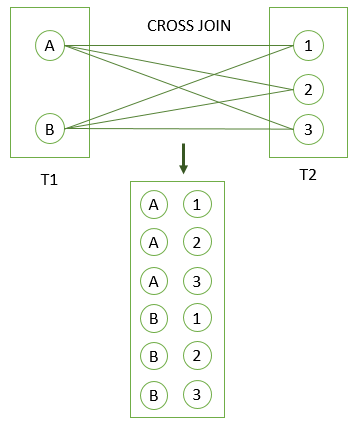
A CROSS JOIN clause allows you to produce a Cartesian Product of rows in two or more tables.
Different from other join clauses such as LEFT JOIN or INNER JOIN, the CROSS JOIN clause does not have a join predicate.
Suppose you have to perform a CROSS JOIN of two tables T1 and T2. If T1 has n rows and T2 has m rows, the result set will have nxm rows.
|
|
self-join
A self-join is a regular join that joins a table to itself. In practice, you typically use a self-join to query hierarchical data or to compare rows within the same table.
|
|
USING Clause
The USING clause specifies which columns to test for equality when two tables are joined. It can be used instead of an ON clause in the JOIN operations that have an explicit join clause.
The following query performs an inner join between the countries table and the cities table on the condition that countries.countryis equal to cities.country:
|
|
The next query is similar to the one above, but it has the additional join condition that countries.countryis equal to cities.country_iso_code:
|
|
SELECT … INTO Statement
GROUP BY Clause
The GROUP BY clause divides the rows returned from the SELECT statement into groups. For each group, you can apply an aggregate function e.g., SUM() to calculate the sum of items or COUNT() to get the number of items in the groups.
|
|
-
Using
GROUP BYwithout an aggregate function1 2 3 4 5 6SELECT customer_id FROM payment GROUP BY customer_id; -
Using
GROUP BYwithSUM()function1 2 3 4 5 6 7SELECT customer_id, SUM (amount) FROM payment GROUP BY customer_id; -
Using
GROUP BYclause with theJOINclause1 2 3 4 5 6 7 8 9SELECT first_name || ' ' || last_name full_name, SUM (amount) amount FROM payment INNER JOIN customer USING (customer_id) GROUP BY full_name ORDER BY amount DESC; -
Using
GROUP BYwithCOUNT()function1 2 3 4 5 6 7SELECT staff_id, COUNT (payment_id) FROM payment GROUP BY staff_id; -
Using
GROUP BYwith multiple columns1 2 3 4 5 6 7 8 9 10 11SELECT customer_id, staff_id, SUM(amount) FROM payment GROUP BY staff_id, customer_id ORDER BY customer_id; -
Using GROUP BY clause with a date column
1 2 3 4 5 6 7SELECT DATE(payment_date) paid_date, SUM(amount) sum FROM payment GROUP BY DATE(payment_date);
HAVING Clause
The HAVING clause specifies a search condition for a group or an aggregate. The HAVING clause is often used with the GROUP BY clause to filter groups or aggregates based on a specified condition.
The HAVING clause, like the WHERE clause, specifies selection conditions. The WHERE clause specifies conditions on columns in the select list, but cannot refer to aggregate functions. The HAVING clause specifies conditions on groups, typically formed by the GROUP BY clause. The query result includes only groups satisfying the HAVING conditions. (If no GROUP BY is present, all rows implicitly form a single aggregate group.)
|
|
|
|
Confirming Indexes
It will show you all the indexes present in the server.
|
|
Aliases
Column Aliases
|
|
Standard SQL disallows references to column aliases in a WHERE clause. This restriction is imposed because when the WHERE clause is evaluated, the column value may not yet have been determined.
In the select list of a query, a quoted column alias can be specified using identifier or string quoting characters:
|
|
Elsewhere in the statement, quoted references to the alias must use identifier quoting or the reference is treated as a string literal.
Table Alias
|
|
Subqueries
The Subquery as Scalar Operand Comparisons Using Subqueries
Subqueries with ANY, IN, or SOME
ANY compares a value to each value in a list or results from a query and evaluates to true if the result of an inner query contains at least one row.
|
|
Where comparison_operator is one of these operators:
|
|
When used with a subquery, the word IN is an alias for = ANY. IN and = ANY are not synonyms when used with an expression list. IN can take an expression list, but = ANY cannot.
The word SOME is an alias for ANY.
Subqueries with ALL
The ALL operator returns TRUE if all of the subqueries values meet the condition
|
|
In general, tables containing NULL values and empty tables are “edge cases.” When writing subqueries, always consider whether you have taken those two possibilities into account.
NOT IN is an alias for <> ALL.
Subqueries with EXISTS
The EXISTS condition in SQL is used to check whether the result of a correlated nested query is empty (contains no tuples) or not. The result of EXISTS is a boolean value True or False.
|
|
Row Subqueries Subqueries with EXISTS or NOT EXISTS Correlated Subqueries Derived Tables Lateral Derived Tables Subquery Errors Optimizing Subqueries Restrictions on Subqueries
Data manipulation language (DML)
INSERT Statement
The first method is to specify only the value of data to be inserted without the column names.
|
|
In the second method we will specify both the columns which we want to fill and their corresponding values.
|
|
INSERT IGNORE Statement
This means that an INSERT IGNORE statement which contains a duplicate value in a UNIQUE index or PRIMARY KEY field does not produce an error, but will instead simply ignore that particular INSERT command entirely.
|
|
INSERT … SELECT Statement
We can use the SELECT statement with INSERT INTO statement to copy rows from one table and insert them into another table.
|
|
INSERT … ON DUPLICATE KEY UPDATE Statement INSERT DELAYED Statement
UPDATE Statement
|
|
DELETE Statement
Deleting a row from a view first delete the row from the actual table and the change is then reflected in the view.
|
|
MERGE Statement
|
|
|
|
UNION Clause
UNION combines the result from multiple query blocks into a single result set.
If neither DISTINCT nor ALL is specified, the default is DISTINCT. DISTINCT can remove duplicates from either side of the intersection.
The operands must have the same number of columns.
|
|
INTERSECT Clause
INTERSECT limits the result from multiple query blocks to those rows which are common to all.
If neither DISTINCT nor ALL is specified, the default is DISTINCT. DISTINCT can remove duplicates from either side of the intersection.
The operands must have the same number of columns.
|
|
INTERSECT has greater precedence than and is evaluated before UNION and EXCEPT, so that the two statements shown here are equivalent:
|
|
EXCEPT Clause
EXCEPT limits the result from the first query block to those rows which are (also) not found in the second.
If neither DISTINCT nor ALL is specified, the default is DISTINCT. DISTINCT can remove duplicates from either side of the intersection.
The operands must have the same number of columns.
|
|
Difference between EXCEPT and NOT IN Clause: EXCEPT automatically removes all duplicates in the final result, whereas NOT IN retains duplicate tuples. It is also important to note that EXCEPT is not supported by MySQL.
CALL Statement
Call a PL/SQL or JAVA subprogram.
LOCK Statement
Table control concurrency.
EXPLAIN PLAN Statement
It describes the access path to data.
DO Statement EXCEPT Clause HANDLER Statement
INTERSECT Clause LOAD DATA Statement LOAD XML Statement Parenthesized Query Expressions REPLACE Statement
Set Operations with UNION, INTERSECT, and EXCEPT
TABLE Statement
UNION Clause VALUES Statement
IMPORT TABLE Statement
WITH (Common Table Expressions)
A common table expression (CTE) is a named temporary result set that exists within the scope of a single statement and that can be referred to later within that statement, possibly multiple times.
The following example defines CTEs named cte1 and cte2 in the WITH clause, and refers to them in the top-level SELECT that follows the WITH clause:
|
|
In the statement containing the WITH clause, each CTE name can be referenced to access the corresponding CTE result set.
Data control language (DCL)
GRANT Statement
|
|
|
|
|
|
REVOKE Statement
|
|
|
|
Transaction control language (TCL)
A database transaction, by definition, must be atomic, consistent, isolated, and durable.
These are popularly known as ACID properties. These properties can ensure the concurrent execution of multiple transactions without conflict.
Properties of Transaction:
- Atomicity: The outcome of a transaction can either be completely successful or completely unsuccessful. The whole transaction must be rolled back if one part of it fails.
- Consistency: Transactions maintain integrity restrictions by moving the database from one valid state to another.
- Isolation: Concurrent transactions are isolated from one another, assuring the accuracy of the data.
- Durability: Once a transaction is committed, its modifications remain in effect even in the event of a system failure.
BEGIN Statement
Start a new transaction.
|
|
SET Statement
The values for the properties of the current transaction, such as the transaction isolation level and access mode.
|
|
COMMIT Statement
Commits a Transaction.
The COMMIT command saves all the transactions to the database since the last COMMIT or ROLLBACK command.
|
|
ROLLBACK Statement
Rollbacks a transaction in case of any error occurs. This command can only be used to undo transactions since the last COMMIT or ROLLBACK command was issued.
|
|
SAVEPOINT Statement
Sets a save point within a transaction.
SAVEPOINT creates points within the groups of transactions in which to ROLLBACK.
A SAVEPOINT is a point in a transaction in which you can roll the transaction back to a certain point without rolling back the entire transaction.
|
|
Syntax for rolling back to Savepoint Command:
|
|
RELEASE Statement
This command is used to remove a SAVEPOINT that you have created.
|
|
START TRANSACTION, COMMIT, and ROLLBACK Statements
START TRANSACTION, COMMIT, and ROLLBACK Statements Statements That Cannot Be Rolled Back Statements That Cause an Implicit Commit SAVEPOINT, ROLLBACK TO SAVEPOINT, and RELEASE SAVEPOINT Statements LOCK INSTANCE FOR BACKUP and UNLOCK INSTANCE Statements LOCK TABLES and UNLOCK TABLES Statements SET TRANSACTION Statement XA Transactions
Compound Statement Syntax
Flow Control Statements
CASE Statement
|
|
Or:
|
|
Utility Statements
DESCRIBE Statement
|
|