From Monolith to Microservices
The Legacy Monolith:
- In time, the new features and improvements added to code complexity, making development more challenging - loading, compiling, and building times increase with every new update.
- A monolith has a rather expensive taste in hardware.
- Since the entire monolith application runs as a single process, the scaling of individual features of the monolith is almost impossible.
- During upgrades, patches or migrations of the monolith application downtime is inevitable and maintenance windows have to be planned well in advance as disruptions in service are expected to impact clients.
The Modern Microservice:
-
Microservices can be deployed individually on separate servers provisioned with fewer resources.
-
Microservices-based architecture is aligned with Event-driven Architecture and Service-Oriented Architecture (SOA) principles, where complex applications are composed of small independent processes which communicate with each other through Application Programming Interfaces (APIs) over a network.
-
Each microservice is developed and written in a modern programming language, selected to be the best suitable for the type of service and its business function.
-
One of the greatest benefits of microservices is scalability. Each microservice can be scaled individually.
-
There is virtually no downtime and no service disruption to clients because upgrades are rolled out seamlessly. Businesses are able to develop and roll-out new features and updates a lot faster, in an agile approach, having separate teams focusing on separate features, thus being more productive and cost-effective.
containers:
- Eventually a solution emerged to tackle these refactoring challenges. Application containers came along providing encapsulated lightweight runtime environments for application modules.
Container Orchestration
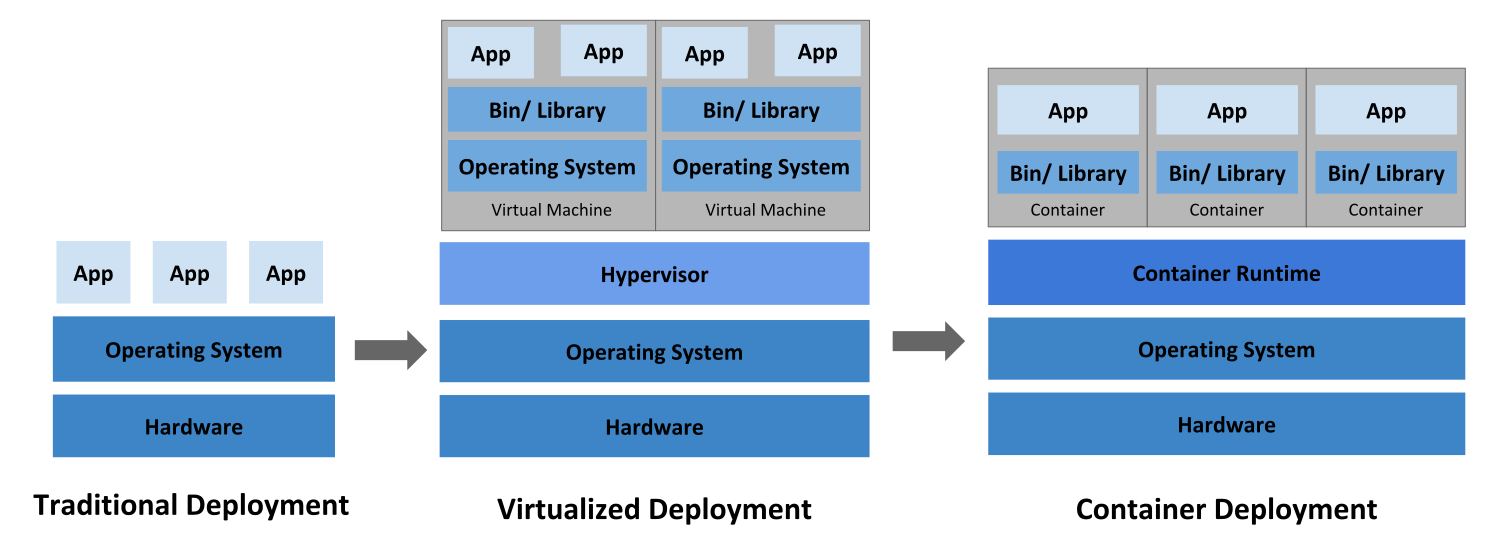
Traditional deployment era: Early on, organizations ran applications on physical servers. There was no way to define resource boundaries for applications in a physical server, and this caused resource allocation issues.
Virtualized deployment era: Virtualization allows applications to be isolated between VMs and provides a level of security as the information of one application cannot be freely accessed by another application.
Virtualization allows better utilization of resources in a physical server and allows better scalability because an application can be added or updated easily, reduces hardware costs, and much more. With virtualization you can present a set of physical resources as a cluster of disposable virtual machines.
Container deployment era: Containers are similar to VMs, but they have relaxed isolation properties to share the Operating System (OS) among the applications. Therefore, containers are considered lightweight. Similar to a VM, a container has its own filesystem, share of CPU, memory, process space, and more. As they are decoupled from the underlying infrastructure, they are portable across clouds and OS distributions.
Why Use Container Orchestrators?
- Containers are a good way to bundle and run your applications.
- Group hosts together while creating a cluster.
- Schedule containers to run on hosts in the cluster based on resources availability.
- Enable containers in a cluster to communicate with each other regardless of the host they are deployed to in the cluster.
- Bind containers and storage resources.
- Group sets of similar containers and bind them to load-balancing constructs to simplify access to containerized applications by creating an interface, a level of abstraction between the containers and the client.
- Manage and optimize resource usage.
- Allow for implementation of policies to secure access to applications running inside containers.
Tutorials
minikube with Proxy
macOS and Linux:
1
2
3
4
5
|
export HTTP_PROXY=http://<proxy hostname:port>
export HTTPS_PROXY=https://<proxy hostname:port>
export NO_PROXY=localhost,127.0.0.1,10.96.0.0/12,192.168.59.0/24,192.168.49.0/24,192.168.39.0/24

minikube start
|
Windows:
1
2
3
4
5
|
set HTTP_PROXY=http://<proxy hostname:port>
set HTTPS_PROXY=https://<proxy hostname:port>
set NO_PROXY=localhost,127.0.0.1,10.96.0.0/12,192.168.59.0/24,192.168.49.0/24,192.168.39.0/24

minikube start
|
The NO_PROXY variable here is important: Without setting it, minikube may not be able to access resources within the VM. minikube uses four default IP ranges, which should not go through the proxy.
Learn Kubernetes Basics
The common format of a kubectl command is:
1
|
kubectl action resource
|
Using Minikube to Create a Cluster
1
|
sudo pacman -S minikube libvirt qemu-desktop dnsmasq iptables-nft
|
1
2
3
4
|
sudo usermod -aG libvirt $(whoami)
sudo systemctl start libvirtd.service
sudo systemctl enable libvirtd.service
sudo systemctl status libvirtd.service
|
set the kvm2 provider in minikube:
1
|
docker context use default
|
1
|
minikube config set driver kvm2
|
1
|
touch config && export KUBECONFIG=$(pwd)/config
|
Check that kubectl is configured to talk to your cluster, by running the kubectl version command.
Using kubectl to Create a Deployment
The Deployment instructs Kubernetes how to create and update instances of your application.
Create a Deployment:
1
|
kubectl create deployment <deployment-name> --image=<app-image-location>
|
To list your deployments:
1
|
kubectl get deployments
|
Create a proxy that will forward communications into the cluster-wide
See all those APIs hosted through the proxy endpoint, If port 8001 is not accessible, ensure that the kubectl proxy that you started above is running in the second terminal.
1
|
curl http://localhost:8001/version
|
In order for the new Deployment to be accessible without using the proxy, a Service is required.
To shut down the application, you would need to delete the Deployment as well.
Viewing Pods and Nodes to Explore Your App
A Pod is a Kubernetes abstraction that represents a group of one or more application containers (such as Docker), and some shared resources for those containers. The containers in a Pod share an IP Address and port space, are always co-located and co-scheduled, and run in a shared context on the same Node.
Pods are the atomic unit on the Kubernetes platform. When we create a Deployment on Kubernetes, that Deployment creates Pods with containers inside them (as opposed to creating containers directly). Each Pod is tied to the Node where it is scheduled, and remains there until termination (according to restart policy) or deletion. In case of a Node failure, identical Pods are scheduled on other available Nodes in the cluster.
A Pod always runs on a Node. A Node is a worker machine in Kubernetes and may be either a virtual or a physical machine, depending on the cluster. Each Node is managed by the control plane. A Node can have multiple pods, and the Kubernetes control plane automatically handles scheduling the pods across the Nodes in the cluster.
1
2
3
4
|
kubectl get - list resources
kubectl describe - show detailed information about a resource
kubectl logs - print the logs from a container in a pod
kubectl exec - execute a command on a container in a pod
|
Check application configuration
To view the nodes in the cluster:
Looking for existing Pods:
To view what containers are inside that Pod and what images are used to build those containers:
Show the app in the terminal
Run a proxy in a second terminal:
1
|
export POD_NAME="$(kubectl get pods -o go-template --template '{{range .items}}{{.metadata.name}}{{"\n"}}{{end}}')"
|
1
|
echo Name of the Pod: $POD_NAME
|
1
|
curl http://localhost:8001/api/v1/namespaces/default/pods/$POD_NAME:8080/proxy/
|
View the container logs
1
|
kubectl logs "$POD_NAME"
|
Executing command on the container
List the environment variables:
1
|
kubectl exec "$POD_NAME" -- env
|
Start a bash session in the Pod’s container:
1
|
kubectl exec -ti $POD_NAME -- bash
|
Using a Service to Expose Your App Publicly
When a worker node dies, the Pods running on the Node are also lost. A ReplicaSet might then dynamically drive the cluster back to the desired state via the creation of new Pods to keep your application running. Each Pod in a Kubernetes cluster has a unique IP address, even Pods on the same Node, so there needs to be a way of automatically reconciling changes among Pods so that your applications continue to function.
A Service in Kubernetes is an abstraction which defines a logical set of Pods and a policy by which to access them. Although each Pod has a unique IP address, those IPs are not exposed outside the cluster without a Service.
Create service
To create a new service and expose it to external traffic
1
|
kubectl expose deployment/kubernetes-bootcamp --type="NodePort" --port 8080
|
1
|
kubectl describe services/<service-name>
|
1
2
|
export NODE_PORT="$(kubectl get services/kubernetes-bootcamp -o go-template='{{(index .spec.ports 0).nodePort}}')"
echo "NODE_PORT=$NODE_PORT"
|
1
|
curl http://"$(minikube ip):$NODE_PORT"
|
Using labels
1
2
|
kubectl get pods -l label-name=label-value
kubectl get services -l label-name=label-value
|
1
|
kubectl get pods -l app=kubernetes-bootcamp
|
1
|
kubectl get services -l app=kubernetes-bootcamp
|
1
2
|
export POD_NAME="$(kubectl get pods -o go-template --template '{{range .items}}{{.metadata.name}}{{"\n"}}{{end}}')"
echo "Name of the Pod: $POD_NAME"
|
apply a new label
1
|
kubectl label pods "$POD_NAME" version=v1
|
1
|
kubectl describe pods "$POD_NAME"
|
1
|
kubectl get pods -l version=v1
|
Deleting a service
1
|
kubectl delete service -l app=kubernetes-bootcamp
|
Confirm that the Service is gone:
Confirm that the application is not reachable anymore from outside of the cluster:
1
|
curl http://"$(minikube ip):$NODE_PORT"
|
Confirm that the app is still running with a curl from inside the pod:
1
|
kubectl exec -ti $POD_NAME -- curl http://localhost:8080
|
Scale Your App
Running multiple instances of an application will require a way to distribute the traffic to all of them. Services have an integrated load-balancer that will distribute network traffic to all Pods of an exposed Deployment. Services will monitor continuously the running Pods using endpoints, to ensure the traffic is sent only to available Pods.
Once you have multiple instances of an application running, you would be able to do Rolling updates without downtime.
Scaling a Deployment
To list your Deployments:
1
|
kubectl get deployments
|
To see the ReplicaSet created by the Deployment, run:
Scale the Deployment to 4 replicas:
1
|
kubectl scale deployments/kubernetes-bootcamp --replicas=4
|
Check if there are 4 application instances available:
1
|
kubectl get deployments
|
Check if the number of Pods changed:
1
|
kubectl get pods -o wide
|
Load Balancing
Check that the Service is load-balancing the traffic:
1
|
kubectl describe services/kubernetes-bootcamp
|
1
2
|
export NODE_PORT="$(kubectl get services/kubernetes-bootcamp -o go-template='{{(index .spec.ports 0).nodePort}}')"
echo NODE_PORT=$NODE_PORT
|
1
|
curl http://"$(minikube ip):$NODE_PORT"
|
Scale Down
1
|
kubectl scale deployments/kubernetes-bootcamp --replicas=2
|
1
|
kubectl get deployments
|
1
|
kubectl get pods -o wide
|
Rolling Update Your App
In Kubernetes, updates are versioned and any Deployment update can be reverted to a previous (stable) version.
Update the version of the app
1
|
kubectl get deployments
|
To update the image of the application to version 2, use the set image subcommand, followed by the deployment name and the new image version:
1
|
kubectl set image deployments/kubernetes-bootcamp kubernetes-bootcamp=jocatalin/kubernetes-bootcamp:v2
|
Verify an update
1
|
kubectl describe services/kubernetes-bootcamp
|
Reference