In general, you are going to have to end up with
- Header files in a directory somewhere
- library files (either static libraries, or DLLs/shared objects). If the library is a header-only library like some of the boost libraries, then you won’t need this.
You get hold of the library files, either by building them on your machine (typical for open source projects, and projects aimed at Linux platforms), or by downloading the pre-compiled binaries (typical for Windows libraries, particularly paid-for).
When you try to compile with the library, you may need a command line option (eg -I) to specify the directory containing the header files, and you may need a linker option (eg -l) to tell the linker to link against your library.
Linux
Use Linux distribution’s packaging system
If you are installing the libraries with a package manager, they will probably all end up in the right place. If not you can get the compiler to search for the by providing the an additional search path using the -L <path> flag. You should be able to pass this extra flag to CMake.
build and install
|
|
two main options for where to put the library:
/usr/local(libraries under/usr/local/lib, headers under/usr/local/include).- Under your project directory, as you did under Windows. This has the advantages of not requiring root access and not making systemwide changes, but you’ll have to update your project’s include paths and library paths, and you’ll have to put any shared library files someplace where the dynamic linker can find them (using
LD_LIBRARY_PATHorld.so.conf- see the link for more details).
header-only library
No linking against pre-compiled code is required for header-only library. It can be included directly by
|
|
In a unix environment for boost you can install it in a path where your compiler looks for headers, or specify the path manually.
In unix /usr/include or /usr/local/include is the location where the compiler looks for headers.
While compiling you have to link your project with boost.
For example:
g++ -I /usr/local/boost -lboost_system
Or, if you are using cmake in your project, there is a findboost option where you can specify which boost headers you want to be included in your project.
/usr/local/lib/ should be the right folder for this. It is the normal place for keeping shared library files installed manually from source code. If you build a library by running ./configure, make, and sudo make install, it will usually install there automatically.
Example
Eigen c++ is a header only library: you don’t have to install it, you just download it, unzip it and link your code against it.
For example, if your code is in my_favorite_cpp_folder, you do:
|
|
and, assuming your compiler is gcc and the eigen headers are in/usr/local/include/eigen3/unsupported/ and the name of your source file is my_favorite_cpp_source_file.cpp, you compile and code and link it to the eigen headers by doing:
|
|
(from your code output posted above, the eigen headers are in /usr/local/include/eigen3/ in your computer)
Since the header files are in /usr/local/include/ folder you don’t need to compile your source-code files against them using “g++ -I …. .”
- Use the
-Icompiler option to point to the 3rd party libraries directory (-I/usr/local/include/ohNet) - Use
#include "[whatever you need from oHNet].h"in your header files and compilation units as needed (Note: you might need to put relative prefix pathes for subdirecories in the 3rd party include paths tree here!) - Use the
-Llinker option to specify a path to the 3rd party libs you need (-L/usr/local/libprobably) - Use the
-llinker option to specify any concrete 3rd libs you need (-l[oHNet]probably)
Look in the directories what actually was installed there to figure what to place for [whatever you need from oHNet].h and [oHNet], s.th. like liboHNet.a for the latter.
You didn’t tag [tag:Eclipse CDT] explicitly here, but go to the Project->Properties->C++ Builder->Settings Dialog and look for C/C++ Includes and Linker Options.
Windows
Configuring MS Visual C++ to use external libraries
-
decompress file and then have the binary part of the Boost library built.
-
Set up the include directory
This is the directory that contains the header files (.h/hpp)

-
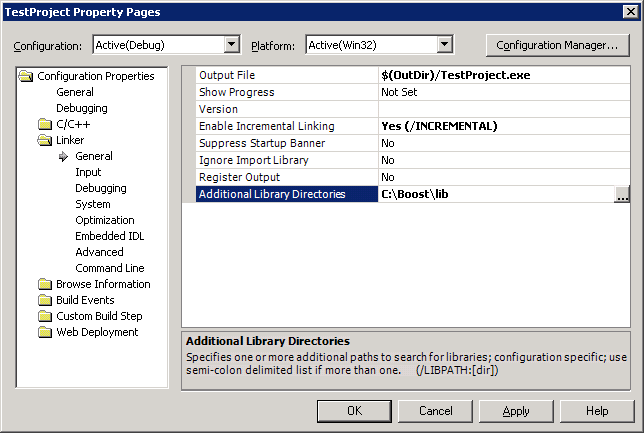
Set up the library directory
This is the directory that contains the pre-compiled library files (.lib)
-
Library files
Enter library filenames in additional dependencies for the libraries to use, if your compiler or the library don’t supports auto-linking.

-
Dynamic libraries
In case of dynamically loaded (.dll) libraries, one also has to place the DLL-files either in the same folder as the executable, or in the system PATH.
-
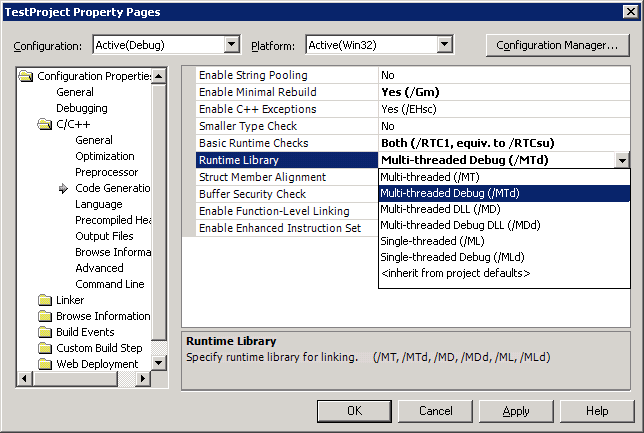
Run-time library
The libraries also have to be compiled with the same run-time library as the one used in your project.
https://blog.csdn.net/tjq980303/article/details/54585369
https://techoverflow.net/2013/03/15/simple-c-http-download-using-libcurl-easy-api/
vcpkg
Microsoft/vcpkg: VC++ Packaging Tool
https://www.zhihu.com/question/47331502
https://www.zhihu.com/question/263416411
QT
http://doc.qt.io/qtcreator/creator-project-qmake-libraries.html