Getting Started
The Java programming language is a high-level language that can be characterized by all of the following buzzwords:
- Simple
- Object oriented
- Distributed
- Multithreaded
- Dynamic
- Architecture neutral
- Portable
- High performance
- Robust
- Secure
An overview of the software development process:
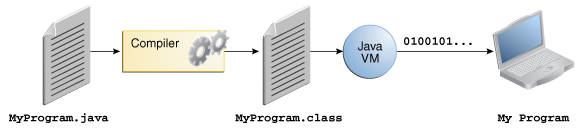
all source code is first written in plain text files ending with the .java extension. Those source files are then compiled into .class files by the javac compiler. A .class file does not contain code that is native to your processor; it instead contains bytecodes — the machine language of the Java Virtual Machine1 (Java VM). The java launcher tool then runs your application with an instance of the Java Virtual Machine.
The Java platform has two components:
- The Java Virtual Machine
- The Java Application Programming Interface (API)
|
|
|
|
|
|
Language Basics
Comments
|
|
Primitive Data Types
The Java programming language is statically-typed, which means that all variables must first be declared before they can be used. This involves stating the variable’s type and name
|
|
The eight primitive data types supported by the Java programming language are:
- byte: The
bytedata type is an 8-bit signed two’s complement integer. Thebytedata type can be useful for saving memory in large arrays. - short: The
shortdata type is a 16-bit signed two’s complement integer. You can use ashortto save memory in large arrays, in situations where the memory savings actually matters. - int: By default, the
intdata type is a 32-bit signed two’s complement integer In Java SE 8 and later, you can use theintdata type to represent an unsigned 32-bit integer. Use the Integer class to useintdata type as an unsigned integer. Static methods likecompareUnsigned,divideUnsignedetc have been added to the Integer class to support the arithmetic operations for unsigned integers. - long: The
longdata type is a 64-bit two’s complement integer. In Java SE 8 and later, you can use thelongdata type to represent an unsigned 64-bit long. Use this data type when you need a range of values wider than those provided byint. TheLongclass also contains methods likecompareUnsigned,divideUnsignedetc to support arithmetic operations for unsigned long. - float: As with the recommendations for
byteandshort, use afloat(instead ofdouble) if you need to save memory in large arrays of floating point numbers. This data type should never be used for precise values, such as currency. For that, you will need to use thejava.math.BigDecimalclass instead. - double: For decimal values, this data type is generally the default choice. As mentioned above, this data type should never be used for precise values, such as currency.
- boolean: The
booleandata type has only two possible values:trueandfalse. Use this data type for simple flags that track true/false conditions. - char: The
chardata type is a single 16-bit Unicode character. It has a minimum value of'\u0000'(or 0) and a maximum value of'\uffff'(or 65,535 inclusive).
Default Values
It’s not always necessary to assign a value when a field is declared. Fields that are declared but not initialized will be set to a reasonable default by the compiler. Generally speaking, this default will be zero or null, depending on the data type. Relying on such default values, however, is generally considered bad programming style.
| Data Type | Default Value (for fields) |
|---|---|
| byte | 0 |
| short | 0 |
| int | 0 |
| long | 0L |
| float | 0.0f |
| double | 0.0d |
| char | ‘\u0000’ |
| String (or any object) | null |
| boolean | false |
Local variables are slightly different; the compiler never assigns a default value to an uninitialized local variable. If you cannot initialize your local variable where it is declared, make sure to assign it a value before you attempt to use it. Accessing an uninitialized local variable will result in a compile-time error.
Literals
You may have noticed that the new keyword isn’t used when initializing a variable of a primitive type.
Character and String Literals
Always use ‘single quotes’ for char literals and “double quotes” for String literals.
The Java programming language also supports a few special escape sequences for char and Stringliterals: \b (backspace), \t (tab), \n (line feed), \f (form feed), \r (carriage return), \" (double quote), \'(single quote), and \\ (backslash).
There’s also a special null literal that can be used as a value for any reference type. null may be assigned to any variable, except variables of primitive types. There’s little you can do with a null value beyond testing for its presence. Therefore, null is often used in programs as a marker to indicate that some object is unavailable.
Finally, there’s also a special kind of literal called a class literal, formed by taking a type name and appending “.class"; for example, String.class. This refers to the object (of type Class) that represents the type itself.
Variables and Constants
The Java programming language defines the following kinds of variables:
- Instance Variables (Non-Static Fields) Technically speaking, objects store their individual states in “non-static fields”, that is, fields declared without the
statickeyword. Non-static fields are also known as instance variables because their values are unique to each instance of a class (to each object, in other words); thecurrentSpeedof one bicycle is independent from thecurrentSpeedof another. - Class Variables (Static Fields) A class variable is any field declared with the
staticmodifier; this tells the compiler that there is exactly one copy of this variable in existence, regardless of how many times the class has been instantiated. A field defining the number of gears for a particular kind of bicycle could be marked asstaticsince conceptually the same number of gears will apply to all instances. The codestatic int numGears = 6;would create such a static field. Additionally, the keywordfinalcould be added to indicate that the number of gears will never change. - Local Variables a method will often store its temporary state in local variables. There is no special keyword designating a variable as local; that determination comes entirely from the location in which the variable is declared — which is between the opening and closing braces of a method. As such, local variables are only visible to the methods in which they are declared; they are not accessible from the rest of the class.
- Parameters Recall that the signature for the
mainmethod ispublic static void main(String[] args). Here, theargsvariable is the parameter to this method.
Naming
Every programming language has its own set of rules and conventions for the kinds of names that you’re allowed to use:
- Variable names are case-sensitive. The convention, is to always begin your variable names with a letter, not “
$” or “_”. ` - When choosing a name for your variables, use full words instead of cryptic abbreviations. Also keep in mind that the name you choose must not be a keyword or reserved word.
- If the name you choose consists of only one word, spell that word in all lowercase letters. If it consists of more than one word, capitalize the first letter of each subsequent word. The names
gearRatioandcurrentGearare prime examples of this convention. If your variable stores a constant value, such asstatic final int NUM_GEARS = 6, the convention changes slightly, capitalizing every letter and separating subsequent words with the underscore character. By convention, the underscore character is never used elsewhere.
Constants
The keyword final indicates that you can assign to the variable once, and then its value is set once and for all. It is customary to name constants in all uppercase.
|
|
Set up a class constant with the keywords static final.
|
|
Enumerated Types
|
|
|
|
Operators
| Operators | Precedence |
|---|---|
| postfix | expr++ expr-- |
| unary | ++expr --expr +expr -expr ~ ! |
| multiplicative | * / % |
| additive | + - |
| shift | << >> >>> |
| relational | < > <= >= instanceof |
| equality | == != |
| bitwise AND | & |
| bitwise exclusive OR | ^ |
| bitwise inclusive OR | ` |
| logical AND | && |
| logical OR | ` |
| ternary | ? : |
| assignment | `= += -= *= /= %= &= ^= |
Strings
In addition to the eight primitive data types listed above, the Java programming language also provides special support for character strings via the java.lang.String class. Enclosing your character string within double quotes will automatically create a new String object.
|
|
String objects are immutable, which means that once created, their values cannot be changed. The String class is not technically a primitive data type, but considering the special support given to it by the language, you’ll probably tend to think of it as such.
Expressions, Statements, and Blocks
|
|
|
|
Input and Output
Reading Input
|
|
|
|
|
|
|
|
|
|
The Scanner class is not suitable for reading a password from a console since the input is plainly visible to anyone.
|
|
Formatting Output
|
|
| Character | Conversion Type | Character | Conversion Type |
|---|---|---|---|
| d | decimal | s | String |
| x | Hexadecimal integer | c | Character |
| o | Octal integer | b | boolean |
| f | float | h | |
| e | tx | Date and time | |
| g | % | ||
| a | n |
Date and Time Conversion Characters
| Character | Conversion Type | Character | Conversion Type |
|---|---|---|---|
| c | Complete date and time | D | 02/09/2015 |
| F | 2015-02-09 | T | 18:05:19 |
| r | 06:05:19 pm |
|
|
|
|
File Input and Output
To read from a file
|
|
To write to a file
|
|
When you specify a relative file name, the file is located relative to the directory in which the Java virtual machine was started.
If you construct a Scanner with a file that does not exist or a PrintWriter with a file name that cannot be created, an exception occurs.
|
|
Control Flow Statements
The if-else Statements
|
|
The switch Statement
The break statements are necessary because without them, statements in switch blocks fall through: All statements after the matching case label are executed in sequence, regardless of the expression of subsequent case labels, until a break statement is encountered.
|
|
|
|
This example checks if the expression in the switch statement is null. Ensure that the expression in any switch statement is not null to prevent a NullPointerException from being thrown.
This example Call class method getMonthNumber
The while and do-while Statements
|
|
The for Statement
|
|
The three expressions of the for loop are optional; an infinite loop can be created as follows:
|
|
The for statement also has another form designed for iteration through Collections and arrays.
|
|
Branching Statements
|
|
|
|
|
|
The return statement has two forms: one that returns a value, and one that doesn’t. The data type of the returned value must match the type of the method’s declared return value. When a method is declared void, use the form of return that doesn’t return a value.
Big Numbers
Use the static valueOf method to turn an ordinary number into a big
number:
|
|
|
|
|
|
|
|
Arrays
An array is a container object that holds a fixed number of values of a single type. The length of an array is established when the array is created. After creation, its length is fixed.
Declaring Arrays
|
|
|
|
Like declarations for variables of other types, an array declaration has two components: the array’s type and the array’s name. An array’s type is written as type[], where type is the data type of the contained elements; the brackets are special symbols indicating that this variable holds an array. The size of the array is not part of its type (which is why the brackets are empty). As with variables of other types, the declaration does not actually create an array; it simply tells the compiler that this variable will hold an array of the specified type.
Alternatively, you can use the shortcut syntax to create and initialize an array:
|
|
Accessing Array Elements
To find the number of elements of an array, use array.length.
|
|
|
|
The “for each” Loop
|
|
The collection expression must be an array or an object of a class that implements the Iterable interface, such as ArrayList.
|
|
|
|
|
|
Array Copying
|
|
|
|
A common use of this method is to increase the size of an array.
|
|
The additional elements are filled with 0 if the array contains numbers, false if the array contains boolean values.
The System class has an arraycopy method that you can use to efficiently copy data from one array into another:
|
|
|
|
|
|
Some other useful operations provided by methods in the java.util.Arrays class, are:
- Searching an array for a specific value to get the index at which it is placed (the
binarySearchmethod). - Comparing two arrays to determine if they are equal or not (the
equalsmethod). - Filling an array to place a specific value at each index (the
fillmethod).
Command-Line Parameters
|
|
|
|
|
|
Array Sorting
Sorting an array into ascending order. This can be done either sequentially, using the sort method, or concurrently, using the parallelSort method introduced in Java SE 8. Parallel sorting of large arrays on multiprocessor systems is faster than sequential array sorting.
|
|
|
|
Multidimensional Arrays
declare an array of arrays (also known as a multidimensional array) by using two or more sets of brackets, such as String[][] names. A consequence of this is that the rows are allowed to vary in length
|
|
Ragged Arrays
It is also easy to make “ragged” arrays—that is, arrays in which different rows have different lengths.
|
|
|
|
Numbers and Strings
Numbers
When working with numbers, most of the time you use the primitive types in your code. There are, however, reasons to use objects in place of primitives, and the Java platform provides wrapper classes for each of the primitive data types. These classes “wrap” the primitive in an object. The Java compiler automatically wraps (boxes) primitives for you when necessary and unboxes them, again when necessary.
|
|
The following table lists the instance methods that all the subclasses of the Number class implement.
|
|
|
|
|
|
Integer class methods for converting numbers to and from strings and for converting between number systems.
|
|
Formatting Numeric Print Output
You can use format or printf anywhere in your code where you have previously been using print or println.
|
|
| Converter | Explanation |
|---|---|
| d | A decimal integer. |
| f | A float. |
| n | A new line character appropriate to the platform running the application. You should always use %n, rather than \n. |
Beyond Basic Arithmetic
|
|
|
|
Characters
|
|
useful class methods in the Character class
|
|
Escape Sequences
|
|
Strings
In the Java programming language, strings are objects. The String class is immutable.
|
|
useful instance methods
|
|
The + operator is widely used in print statements.
|
|
Converting Between Numbers and Strings
The Number subclasses that wrap primitive numeric types ( Byte, Integer, Double, Float, Long, and Short) each provide a class method named valueOf that converts a string to an object of that type.
|
|
Each of the Number subclasses that wrap primitive numeric types also provides a parseXXXX() method (for example, parseFloat()) that can be used to convert strings to primitive numbers. Since a primitive type is returned instead of an object, the parseFloat() method is more direct than the valueOf() method.
|
|
Converting Numbers to Strings
|
|
|
|
|
|
Manipulating Characters in a String
|
|
|
|
Comparing Strings and Portions of Strings
|
|
|
|
The StringBuilder Class
|
|
|
|
|
|
Autoboxing and Unboxing
Converting a primitive value (an int, for example) into an object of the corresponding wrapper class (Integer) is called autoboxing. The Java compiler applies autoboxing when a primitive value is:
- Passed as a parameter to a method that expects an object of the corresponding wrapper class.
- Assigned to a variable of the corresponding wrapper class.
Converting an object of a wrapper type (Integer) to its corresponding primitive (int) value is called unboxing. The Java compiler applies unboxing when an object of a wrapper class is:
- Passed as a parameter to a method that expects a value of the corresponding primitive type.
- Assigned to a variable of the corresponding primitive type.
Classes and Objects
Object-Oriented Programming Concepts
teaches you the core concepts behind object-oriented programming: objects, messages, classes, and inheritance. This lesson ends by showing you how these concepts translate into code. Feel free to skip this lesson if you are already familiar with object-oriented programming.
Real-world objects share two characteristics: They all have state and behavior. A software object have fields (state) and methods (behavior). Hiding internal state and requiring all interaction to be performed through an object’s methods is known as data encapsulation — a fundamental principle of object-oriented programming.
Classes
Declaring Classes
modifiers, constructor, fields, methods
|
|
naming rules: the first letter of a class name should be capitalized, and the first (or only) word in a method name should be a verb.
|
|
Overloading Methods
The Java programming language supports overloading methods, and Java can distinguish between methods with different method signatures. This means that methods within a class can have the same name if they have different parameter lists (there are some qualifications to this that will be discussed in the lesson titled “Interfaces and Inheritance”).
You cannot declare more than one method with the same name and the same number and type of arguments, because the compiler cannot tell them apart.
Constructors
constructor use the name of the class and have no return type.
You don’t have to provide any constructors for your class, the compiler automatically provides a no-argument, default constructor for any class without constructors. This default constructor will call the no-argument constructor of the superclass. In this situation,
To create a new Bicycle object called myBike, a constructor is called by the new operator:
|
|
All classes have at least one constructor. If a class does not explicitly declare any, the Java compiler automatically provides a no-argument constructor, called the default constructor. This default constructor calls the class parent’s no-argument constructor, or the Object constructor if the class has no other parent. If the parent has no constructor (Object does have one), the compiler will reject the program.
Using Objects
Code that is outside the object’s class must use an object reference or expression, followed by the dot (.) operator, followed by a simple field name, as in:
|
|
You also use an object reference to invoke an object’s method. You append the method’s simple name to the object reference, with an intervening dot operator (.).
|
|
The Garbage Collector
Some object-oriented languages require that you keep track of all the objects you create and that you explicitly destroy them when they are no longer needed. Managing memory explicitly is tedious and error-prone. The Java platform allows you to create as many objects as you want (limited, of course, by what your system can handle), and you don’t have to worry about destroying them. The Java runtime environment deletes objects when it determines that they are no longer being used. This process is called garbage collection.
An object is eligible for garbage collection when there are no more references to that object. References that are held in a variable are usually dropped when the variable goes out of scope. Or, you can explicitly drop an object reference by setting the variable to the special value null. Remember that a program can have multiple references to the same object; all references to an object must be dropped before the object is eligible for garbage collection.
The Java runtime environment has a garbage collector that periodically frees the memory used by objects that are no longer referenced. The garbage collector does its job automatically when it determines that the time is right.
Declaring Classes
subclass: extends, super
|
|
Passing Information to a Method or a Constructor
Arbitrary Number of Arguments
To use varargs, you follow the type of the last parameter by an ellipsis (three dots, …), then a space, and the parameter name.
|
|
Passing Primitive Data Type Arguments
This means that any changes to the values of the parameters exist only within the scope of the method. When the method returns, the parameters are gone and any changes to them are lost.
Passing Reference Data Type Arguments
Reference data type parameters, such as objects, are also passed into methods by value. This means that when the method returns, the passed-in reference still references the same object as before. However, the values of the object’s fields can be changed in the method, if they have the proper access level.
|
|
|
|
Inside the method, circle initially refers to myCircle. The method changes the x and y coordinates of the object that circle references (i.e., myCircle) by 23 and 56, respectively. These changes will persist when the method returns. Then circle is assigned a reference to a new Circle object with x = y = 0. This reassignment has no permanence, however, because the reference was passed in by value and cannot change. Within the method, the object pointed to by circle has changed, but, when the method returns, myCircle still references the same Circle object as before the method was called.
Object
Creating Objects
|
|
- Declaration: The code set in bold are all variable declarations that associate a variable name with an object type.
- Instantiation: The
newkeyword is a Java operator that creates the object. - Initialization: The
newoperator is followed by a call to a constructor, which initializes the new object.
More on Classes
Returning a Value from a Method
A method can return a primitive type or a reference type.
When a method uses a class name as its return type, the class of the type of the returned object must be either a subclass of, or the exact class of, the return type.
This technique, called covariant return type, means that the return type is allowed to vary in the same direction as the subclass.
Using the this Keyword
Within an instance method or a constructor, this is a reference to the current object — the object whose method or constructor is being called. You can refer to any member of the current object from within an instance method or a constructor by using this.
Using this with a Constructor
From within a constructor, you can also use the this keyword to call another constructor in the same class. Doing so is called an explicit constructor invocation.
|
|
Controlling Access to Members of a Class
Access level modifiers determine whether other classes can use a particular field or invoke a particular method. There are two levels of access control:
- At the top level—
public, or package-private (no explicit modifier). - At the member level—
public,private,protected, or package-private (no explicit modifier).
A class may be declared with the modifier public, in which case that class is visible to all classes everywhere. If a class has no modifier (the default, also known as package-private), it is visible only within its own package (packages are named groups of related classes — you will learn about them in a later lesson.)
At the member level, you can also use the public modifier or no modifier (package-private) just as with top-level classes, and with the same meaning. For members, there are two additional access modifiers: private and protected. The private modifier specifies that the member can only be accessed in its own class. The protected modifier specifies that the member can only be accessed within its own package (as with package-private) and, in addition, by a subclass of its class in another package.
Understanding Class Members
-
Class Variables
Fields that have the
staticmodifier in their declaration are called static fields or class variables. They are associated with the class, rather than with any object. Every instance of the class shares a class variable, which is in one fixed location in memory. Any object can change the value of a class variable, but class variables can also be manipulated without creating an instance of the class.Class variables are referenced by the class name itself, as in
1Bicycle.numberOfBicyclesYou can use the
Bicycleconstructor to set theidinstance variable and increment thenumberOfBicyclesclass variable:1 2 3 4 5 6 7 8 9 10 11 12 13 14 15 16 17 18 19 20 21 22 23public class Bicycle { private int cadence; private int gear; private int speed; private int id; // add a class variable for the number of Bicycle objects instantiated private static int numberOfBicycles = 0; public Bicycle(int startCadence, int startSpeed, int startGear){ gear = startGear; cadence = startCadence; speed = startSpeed; // increment number of Bicycles and assign ID number id = ++numberOfBicycles; } // new method to return the ID instance variable public int getID() { return id; } } -
Class Methods
The Java programming language supports static methods as well as static variables. Static methods, which have the
staticmodifier in their declarations, should be invoked with the class name, without the need for creating an instance of the class, as in1ClassName.methodName(args)A common use for static methods is to access static fields.
1 2 3public static int getNumberOfBicycles() { return numberOfBicycles; } -
Constants
The
staticmodifier, in combination with thefinalmodifier, is also used to define constants. Thefinalmodifier indicates that the value of this field cannot change.1static final double PI = 3.141592653589793;Constants defined in this way cannot be reassigned, and it is a compile-time error if your program tries to do so. By convention, the names of constant values are spelled in uppercase letters. If the name is composed of more than one word, the words are separated by an underscore (_).
Initializing Fields
If initialization requires some logic (for example, error handling or a for loop to fill a complex array), simple assignment is inadequate. Instance variables can be initialized in constructors, where error handling or other logic can be used. To provide the same capability for class variables, the Java programming language includes static initialization blocks.
-
Static Initialization Blocks
1 2 3 4 5 6 7class Whatever { public static varType myVar = initializeClassVariable(); private static varType initializeClassVariable() { // initialization code goes here } } -
Initializing Instance Members
A final method cannot be overridden in a subclass.
1 2 3 4 5 6 7class Whatever { private varType myVar = initializeInstanceVariable(); protected final varType initializeInstanceVariable() { // initialization code goes here } }
Packages
Packages are a feature of the Java programming language that help you to organize and structure your classes and their relationships to one another.
A package is a namespace that organizes a set of related classes and interfaces.
The Java Platform API Specification contains the complete listing for all packages, interfaces, classes, fields, and methods supplied by the Java SE platform. Load the page in your browser and bookmark it. As a programmer, it will become your single most important piece of reference documentation.
Creating and Using Packages
Creating a Package
|
|
must be the first line in the source file.
If you put multiple types in a single source file, only one can be public, and it must have the same name as the source file. For example, you can define public class Circle in the file Circle.java, define public interface Draggable in the file Draggable.java, define public enum Day in the file Day.java, and so forth.
Naming a Package
Naming Conventions: Package names are written in all lower case to avoid conflict with the names of classes or interfaces.
perhaps by including the region or the project name after the company name (for example, com.example.region.mypackage).
Packages in the Java language itself begin with java. or javax.
Using Package Members
-
Referring to a Package Member by Its Qualified Name
use fully qualified name when name ambiguities
1packagename.TypeName -
Importing a Package Member
1import packagename.TypeName; -
Importing an Entire Package
1import packagename.*;
At first, **packages appear to be hierarchical, but they are not. **The prefix is used for a number of related packages to make the relationship evident, but not to show inclusion.
you must import both packages with all their files:
|
|
The Static Import Statement allow you access to static final fields (constants) and static methods from one or two classes.
|
|
Managing Source and Class Files
Documentation Comments
Comment Insertion
- Modules
- Packages
- Public classes and interfaces
- Public and protected fields
- Public and protected constructors and methods
You can (and should) supply a comment for each of these features.
Class Comments
The class comment must be placed after any import statements, directly before the class definition.
Method Comments
Each method comment must immediately precede the method that it describes.
In addition to the general-purpose tags, you can use the following tags:
@paramvariable description@returndescription@throwsclass description
Field Comments
You only need to document public fields—generally that means static constants.
General Comments
-
@authorname -
@versiontext -
@sincetext -
@deprecatedtext -
@seereference
Inheritance
In the Java language, classes can be derived from other classes, thereby inheriting fields and methods from those classes. In the absence of any other explicit superclass, every class is implicitly a subclass of Object.
Constructors are not members, so they are not inherited by subclasses, but the constructor of the superclass can be invoked from the subclass.
A subclass inherits all of the public and protected members of its parent, no matter what package the subclass is in. If the subclass is in the same package as its parent, it also inherits the package-private members of the parent.
- You can write a new instance method in the subclass that has the same signature as the one in the superclass, thus overriding it.
- You can write a new static method in the subclass that has the same signature as the one in the superclass, thus hiding it.
- You can write a subclass constructor that invokes the constructor of the superclass, either implicitly or by using the keyword
super.
|
|
|
|
Casting Objects
Casting shows the use of an object of one type in place of another type, among the objects permitted by inheritance and implementations. For example, if we write
|
|
then obj is both an Object and a MountainBike (until such time as obj is assigned another object that is not a MountainBike). This is called implicit casting.
|
|
we would get a compile-time error because obj is not known to the compiler to be a MountainBike. However, we can tell the compiler that we promise to assign a MountainBike to obj by explicit casting:
|
|
This cast inserts a runtime check that obj is assigned a MountainBike so that the compiler can safely assume that obj is a MountainBike.
You can make a logical test as to the type of a particular object using the instanceof operator. This can save you from a runtime error owing to an improper cast.
|
|
Here the instanceof operator verifies that obj refers to a MountainBike so that we can make the cast with knowledge that there will be no runtime exception thrown.
Overriding and Hiding Methods、Overloade Methods
Defining a Method with the Same Signature as a Superclass’s Method:
| – | Superclass Instance Method | Superclass Static Method |
|---|---|---|
| Subclass Instance Method | Overrides | Generates a compile-time error |
| Subclass Static Method | Generates a compile-time error | Hides |
-
Instance Methods
An overriding method can also return a subtype of the type returned by the overridden method. This subtype is called a covariant return type.
When overriding a method, you might want to use the
@Overrideannotation that instructs the compiler that you intend to override a method in the superclass. -
Static Methods:
The distinction between hiding a static method and overriding an instance method has important implications:
-
The version of the overridden instance method that gets invoked is the one in the subclass.
-
The version of the hidden static method that gets invoked depends on whether it is invoked from the superclass or the subclass.
1 2 3 4 5 6 7 8 9 10 11 12 13 14 15 16 17 18 19 20 21 22 23public class Animal { public static void testClassMethod() { System.out.println("The static method in Animal"); } public void testInstanceMethod() { System.out.println("The instance method in Animal"); } } public class Cat extends Animal { public static void testClassMethod() { System.out.println("The static method in Cat"); } public void testInstanceMethod() { System.out.println("The instance method in Cat"); } public static void main(String[] args) { Cat myCat = new Cat(); Animal myAnimal = myCat; Animal.testClassMethod(); // The static method in Animal myAnimal.testInstanceMethod(); // The instance method in Cat } }
-
-
Interface Methods
Default methods and abstract methods in interfaces are inherited like instance methods. Static methods in interfaces are never inherited.
Instance methods are preferred over interface default methods.
In a subclass, you can overload the methods inherited from the superclass. Such overloaded methods neither hide nor override the superclass instance methods—they are new methods, unique to the subclass.
Polymorphism
|
|
Using the Keyword super
|
|
|
|
If a subclass constructor invokes a constructor of its superclass, either explicitly or implicitly, you might think that there will be a whole chain of constructors called, all the way back to the constructor of Object, it is called constructor chaining
Object as a Superclass
-
1protected Object clone() throws CloneNotSupportedExceptionThe simplest way to make your class cloneable is to add
implements Cloneableto your class’s declaration. then your objects can invoke theclone()method.An object contains a reference to an external object, say
ObjExternal, you may need to overrideclone()to get correct behavior. -
1public boolean equals(Object obj)1 2 3 4 5 6 7 8 9public class Book { ... public boolean equals(Object obj) { if (obj instanceof Book) return ISBN.equals((Book)obj.getISBN()); else return false; } }If you override
equals(), you must overridehashCode()as well. -
1protected void finalize() throws Throwableyou can override
finalize()to do cleanup, such as freeing resources. -
1public final Class getClass()You cannot override
getClass.1 2 3 4void printClassName(Object obj) { System.out.println("The object's" + " class is " + obj.getClass().getSimpleName()); } -
1public int hashCode()The value returned by
hashCode()is the object’s hash code, which is the object’s memory address in hexadecimal.By definition, if two objects are equal, their hash code must also be equal. If you override the
equals()method, you change the way two objects are equated andObject’s implementation ofhashCode()is no longer valid. Therefore, if you override theequals()method, you must also override thehashCode()method as well. -
1public String toString()You should always consider overriding the
toString()method in your classes. TheObject’stoString()method returns aStringrepresentation of the object, which is very useful for debugging.1System.out.println(firstBook.toString());
Writing Final Classes and Methods
You can declare some or all of a class’s methods final. You use the final keyword in a method declaration to indicate that the method cannot be overridden by subclasses.
|
|
You might wish to make a method final if it has an implementation that should not be changed and it is critical to the consistent state of the object.
**Methods called from constructors should generally be declared final. **Note that you can also declare an entire class final. A class that is declared final cannot be subclassed.
Abstract Methods and Classes
An abstract class is a class that is declared abstract—it may or may not include abstract methods. Abstract classes cannot be instantiated, but they can be subclassed.
|
|
When an abstract class is subclassed, the subclass usually provides implementations for all of the abstract methods in its parent class. However, if it does not, then the subclass must also be declared abstract.
Abstract Classes Compared to Interfaces:
- similar:
- cannot instantiate
- may contain a mix of methods declared with or without an implementation
- difference:
- abstract classes, you can declare fields that are not static and final, and define public, protected, and private concrete methods.
- interfaces, all fields are automatically public, static, and final, and all methods that you declare or define (as default methods) are public.
- you can extend only one class, whether or not it is abstract, whereas you can implement any number of interfaces.
It is possible to define a class that does not implement all of the interface’s methods, provided that the class is declared to be abstract.
Enumeration Classes
Reflection
A program that can analyze the capabilities of classes is called reflective. The reflection mechanism is extremely powerful. As the next sections show, you can use it to
- Analyze the capabilities of classes at runtime
- Inspect objects at runtime—for example, to write a single toString method that works for all classes
- Implement generic array manipulation code
- Take advantage of Method objects that work just like function pointers in languages such as C++
The Class Class
|
|
|
|
If the class is in a package, the package name is part of the class name:
|
|
You can obtain a Class object corresponding to a class name by using the static forName method.
|
|
A third method for obtaining an object of type Class is a convenient shorthand. If T is any Java type (or the void keyword), then T.class is the matching class object.
|
|
use the == operator to compare class objects.
|
|
use the newInstance method to construct an instance
|
|
Resources
Classes often have associated data files, such as:
- Image and sound files
- Text files with message strings and button labels
In Java, such an associated file is called a resource.
The Class class provides a useful service for locating resource files.
|
|
Using Reflection to Analyze the Capabilities of Classes
print out all information about a class.
|
|
|
|
|
|
|
|
Interfaces, Lambda Expressions, and
Inner Classes
Interface
In the Java programming language, an interface is a reference type, similar to a class, that can contain only constants, method signatures, default methods, static methods, and nested types. Method bodies exist only for default methods and static methods. Interfaces cannot be instantiated—they can only be implemented by classes or extended by other interfaces.
Defining an Interface
The public access specifier indicates that the interface can be used by any class in any package. If you do not specify that the interface is public, then your interface is accessible only to classes defined in the same package as the interface.
An interface can extend other interfaces, just as a class subclass or extend another class. However, whereas a class can extend only one other class, an interface can extend any number of interfaces. The interface declaration includes a comma-separated list of all the interfaces that it extends.
|
|
Note that the method signatures have no braces and are terminated with a semicolon.
The interface body can contain abstract methods, default methods, and static methods. An abstract method within an interface is followed by a semicolon, but no braces (an abstract method does not contain an implementation). Default methods are defined with the default modifier, and static methods with the static keyword. All abstract, default, and static methods in an interface are implicitly public, so you can omit the public modifier.
In addition, an interface can contain constant declarations. All constant values defined in an interface are implicitly public, static, and final. Once again, you can omit these modifiers.
Implementing an Interface
To use an interface, you write a class that implements the interface. When an instantiable class implements an interface, it provides a method body for each of the methods declared in the interface.
|
|
Because ACMEBicycle implements Bicycle, the price of any two ACMEBicycle objects can be compared.
(ACMEBicycle)other casts other to a ACMEBicycle instance. Type casting tells the compiler what the object really is. Invoking getPrice directly on the other instance (other.getPrice()) would fail to compile because the compiler does not understand that other is actually an instance of ACMEBicycle.
Using an Interface as a Type
|
|
By casting object1 to a Bicycle type, it can invoke the isMoreExpensive method.
These methods work for any “Bicycle” objects, no matter what their class inheritance is. When they implement Bicycle, they can be of both their own class (or superclass) type and a Bicycle type. This gives them some of the advantages of multiple inheritance, where they can have behavior from both a superclass and an interface.
Evolving Interfaces
|
|
Suppose that, at a later time, you want to add a third method to DoIt, so that the interface now becomes:
|
|
If you make this change, then all classes that implement the old DoIt interface will break because they no longer implement the old interface. Programmers relying on this interface will protest loudly.
|
|
Now users of your code can choose to continue to use the old interface or to upgrade to the new interface.
Alternatively, you can define your new methods as default methods.
|
|
Note that you must provide an implementation for default methods. You could also define new static methods to existing interfaces. Users who have classes that implement interfaces enhanced with new default or static methods do not have to modify or recompile them to accommodate the additional methods.
Default Methods
Add new functionality to the interfaces, If they add them as static methods, then programmers would regard them as utility methods, not as essential, core methods.
Default methods enable you to add new functionality to the interfaces of your libraries and ensure binary compatibility with code written for older versions of those interfaces.
Extending Interfaces That Contain Default Methods:
- Not mention the default method at all, which lets your extended interface inherit the default method.
- Redeclare the default method, which makes it
abstract. - Redefine the default method, which overrides it.
Static Methods
In addition to default methods, you can define static methods in interfaces. (A static method is a method that is associated with the class in which it is defined rather than with any object. Every instance of the class shares its static methods.) This makes it easier for you to organize helper methods in your libraries; you can keep static methods specific to an interface in the same interface rather than in a separate class.
|
|
Lambda Expressions
Nested Classes
|
|
|
|
|
|
Service Loaders
Proxies
Exceptions, Assertions, and Logging
Dealing with Errors
Caching Exceptions
Using Assertions
Logging
Debugging Tips
Annotations
Annotations, a form of metadata, provide data about a program that is not part of the program itself. Annotations have no direct effect on the operation of the code they annotate.
Annotations Basics
The at sign character (@) indicates to the compiler that what follows is an annotation.
The annotation type can be one of the types that are defined in the java.lang or java.lang.annotation packages of the Java SE API. It is also possible to define your own annotation type.
|
|
Annotations can be applied to declarations: declarations of classes, fields, methods, and other program elements. Annotations can also be applied to the use of types. This form of annotation is called a type annotation.
Declaring an Annotation Type
Many annotations replace comments in code.
|
|
To add this same metadata with an annotation, you must first define the annotation type.
The keyword interface is preceded by the at sign (@) (@ = AT, as in annotation type). Annotation types are a form of interface.
Optional: To make the information in @ClassPreamble appear in Javadoc-generated documentation, you must annotate the @ClassPreamble definition with the @Documented annotation:
|
|
|
|
Predefined Annotation Types
Annotation Types Used by the Java Language:
-
@Deprecated1 2 3 4 5 6 7 8// Javadoc comment follows /** * @deprecated * explanation of why it was deprecated */ @Deprecated static void deprecatedMethod() { } } -
@Override1 2 3 4// mark method as a superclass method // that has been overridden @Override int overriddenMethod() { } -
@SuppressWarnings1 2 3 4 5 6 7 8// use a deprecated method and tell // compiler not to generate a warning // To suppress multiple categories of warnings, use the following syntax: // @SuppressWarnings({"unchecked", "deprecation"}) @SuppressWarnings("deprecation") void useDeprecatedMethod() { objectOne.deprecatedMethod(); }
Annotations That Apply to Other Annotations:
@Retention@Documented@Target@Inherited@Repeatable
Type Annotations and Pluggable Type Systems
Type annotations were created to support improved analysis of Java programs way of ensuring stronger type checking. For example, you want to ensure that a particular variable in your program is never assigned to null; you want to avoid triggering a NullPointerException.
|
|
In many cases, you do not have to write your own type checking modules. There are third parties who have done the work for you. For example, you might want to take advantage of the Checker Framework created by the University of Washington. This framework includes a NonNull module, as well as a regular expression module, and a mutex lock module. For more information, see the Checker Framework.
Repeating Annotations
Declare a Repeatable Annotation Type:
|
|
|
|
|
|
Generics
are a powerful feature of the Java programming language. They improve the type safety of your code, making more of your bugs detectable at compile time.
concurrency
regular expressions
the platform environment.
aaa