Getting Started
Installing and Running Elasticsearch
Install Elasticsearch
|
|
|
|
|
|
Install Kibana
|
|
|
|
|
|
|
|
To launch the Kibana web interface, point your browser to port 5601. For example, http://127.0.0.1:5601.
Installing Sense
Sense is a Kibana app that provides an interactive console for submitting requests to Elasticsearch directly from your browser.
|
|
|
|
Open Sense your web browser by going to http://localhost:5601/app/sense.
Talking to Elasticsearch
A request to Elasticsearch consists of the same parts as any HTTP request:
|
|
To see the headers, use the curl command with the -i switch.
Document Oriented
Elasticsearch is document oriented, meaning that it stores entire objects or documents. It not only stores them, but also indexes the contents of each document in order to make them searchable. In Elasticsearch, you index, search, sort, and filter documents—not rows of columnar data. This is a fundamentally different way of thinking about data and is one of the reasons Elasticsearch can perform complex full-text search.
Elasticsearch uses JavaScript Object Notation, or JSON, as the serialization format for documents.
Indexing Documents
An Elasticsearch cluster can contain multiple indices, which in turn contain multiple types. These types hold multiple documents, and each document has multiple fields.
Index Versus Index Versus Index
You may already have noticed that the word index is overloaded with several meanings in the context of Elasticsearch. A little clarification is necessary:
-
Index (noun)
As explained previously, an index is like a database in a traditional relational database. It is the place to store related documents. The plural of index is indices or indexes.
-
Index (verb)
To index a document is to store a document in an index (noun) so that it can be retrieved and queried. It is much like the
INSERTkeyword in SQL except that, if the document already exists, the new document would replace the old. -
Inverted index
Relational databases add an index, such as a B-tree index, to specific columns in order to improve the speed of data retrieval. Elasticsearch and Lucene use a structure called an inverted index for exactly the same purpose.By default, every field in a document is indexed (has an inverted index) and thus is searchable. A field without an inverted index is not searchable. We discuss inverted indexes in more detail in Inverted Index.
we are going to do the following:
- Index a document per employee, which contains all the details of a single employee.
- Each document will be of type
employee. - That type will live in the
megacorpindex. - That index will reside within our Elasticsearch cluster.
We can perform all of those actions in a single command:
|
|
Retrieving a Document
|
|
Search Lite
|
|
By default, a search will return the top 10 results.
Next, let’s try searching for employees who have “Smith” in their last name.
|
|
Search with Query DSL
Elasticsearch provides a rich, flexible, query language called the query DSL, which allows us to build much more complicated, robust queries.
The domain-specific language (DSL) is specified using a JSON request body.
|
|
This request body is built with JSON, and uses a match query (one of several types of queries, which we will learn about later).
We still want to find all employees with a last name of Smith, but we want only employees who are older than 30.
|
|
Full-Text Search
|
|
By default, Elasticsearch sorts matching results by their relevance score, that is, by how well each document matches the query.
Phrase Search
To do this, we use a slight variation of the match query called the match_phrase query:
|
|
Highlighting Our Searches
|
|
Analytics
Elasticsearch has functionality called aggregations, which allow you to generate sophisticated analytics over your data.
|
|
Aggregations allow hierarchical rollups too.
|
|
Cluster
Elasticsearch is built to be always available, and to scale with your needs. Scale can come from buying bigger servers (vertical scale, or scaling up) or from buying more servers (horizontal scale, or scaling out).
While Elasticsearch can benefit from more-powerful hardware, vertical scale has its limits. Real scalability comes from horizontal scale—the ability to add more nodes to the cluster and to spread load and reliability between them.
One node in the cluster is elected to be the master node, which is in charge of managing cluster-wide changes like creating or deleting an index, or adding or removing a node from the cluster. The master node does not need to be involved in document-level changes or searches.
As users, we can talk to any node in the cluster, including the master node. Every node knows where each document lives and can forward our request directly to the nodes that hold the data we are interested in. Whichever node we talk to manages the process of gathering the response from the node or nodes holding the data and returning the final response to the client. It is all managed transparently by Elasticsearch.
Cluster Health
|
|
The status field provides an overall indication of how the cluster is functioning.
-
greenAll primary and replica shards are active.
-
yellowAll primary shards are active, but not all replica shards are active.
-
redNot all primary shards are active.
Add an Index
To add data to Elasticsearch, we need an index—a place to store related data. In reality, an index is just a logical namespace that points to one or more physical shards.
Shards are how Elasticsearch distributes data around your cluster. Think of shards as containers for data. Documents are stored in shards, and shards are allocated to nodes in your cluster. As your cluster grows or shrinks, Elasticsearch will automatically migrate shards between nodes so that the cluster remains balanced.
A shard can be either a primary shard or a replica shard. Each document in your index belongs to a single primary shard, so the number of primary shards that you have determines the maximum amount of data that your index can hold.
The number of primary shards in an index is fixed at the time that an index is created, but the number of replica shards can be changed at any time.
|
|
It doesn’t make sense to store copies of the same data on the same node.
Add Failover
Starting a Second Node
If we start a third node, our cluster reorganizes itself to look like:
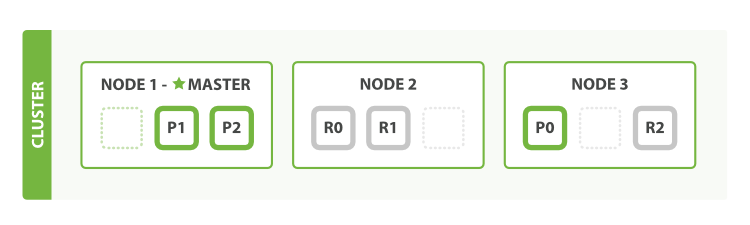
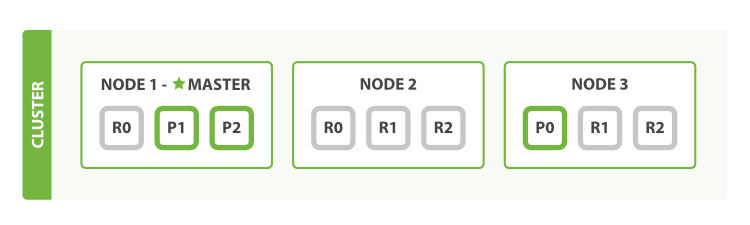
The number of replica shards can be changed dynamically on a live cluster, allowing us to scale up or down as demand requires. Let’s increase the number of replicas from the default of 1 to 2:
Coping with Failure
If we kill the first node, our cluster looks like:
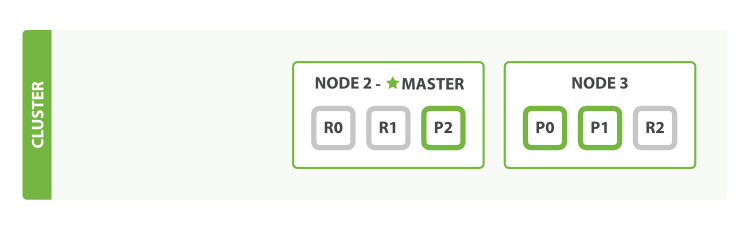
the first thing that happened was that the nodes elected a new master: Node 2.
the first thing that the new master node did was to promote the replicas of these shards on Node 2 and Node 3 to be primaries, putting us back into cluster health yellow.
If we restart Node 1, the cluster would be able to allocate the missing replica shards.