jQuery Get Started

Downloading jQuery

1
2
3
<head>
<script src="jquery-3.3.1.min.js"></script>
</head>

jQuery CDN

1
2
3
<head>
<script src="https://ajax.googleapis.com/ajax/libs/jquery/3.3.1/jquery.min.js"></script>
</head>
1
2
3
<head>
<script src="https://ajax.aspnetcdn.com/ajax/jQuery/jquery-3.3.1.min.js"></script>
</head>

jQuery Syntax

Basic syntax is: $(selector).action()

1
2
3
4
5
// Examples:
$(this).hide() // hides the current element.
$("p").hide() // hides all <p> elements.
$(".test").hide() // hides all elements with class="test".
$("#test").hide() // hides the element with id="test".
1
2
3
4
5
$(document).ready(function(){
   // all jQuery methods inside a document ready event to prevent 
   // any jQuery code from running before the document is finished loading (is ready).

});
1
2
3
4
5
$(document).ready(function(){
    $("p").click(function(){
        $(this).hide();
    });
});

Here are some examples of actions that can fail if methods are run before the document is fully loaded:

  • Trying to hide an element that is not created yet
  • Trying to get the size of an image that is not loaded yet

shorter method for the document ready event:

1
2
3
$(function(){
   // jQuery methods go here...
});

jQuery Selectors

elements elements
$(“element”) selects all elements based on the element name.
$("#id") The #id Selector
$(".class") The .class Selector
$("*") Selects all elements
$(this) Selects the current HTML element
$(“p.intro”) Selects all

elements with class=“intro”

$(“p:first”) Selects the first

element

$(“ul li:first”) Selects the first
  • element of the first
    • $(“ul li:first-child”) Selects the first
    • element of every
      • $("[href]") Selects all elements with an href attribute
        $(“a[target=‘blank’]”) Selects all elements with a target attribute value equal to “blank”
        $(“a[target!=‘blank’]”) Selects all elements with a target attribute value NOT equal to “blank”
        $(":button") Selects all
        $(“tr:even”) Selects all even
        $(“tr:odd”) Selects all odd

        jQuery Events

        some common events:

        Mouse Events Keyboard Events Form Events Document/Window Events
        click keypress submit load
        dblclick keydown change resize
        mouseenter keyup focus scroll
        mouseleave blur unload
        mousedown
        mouseup
        hover

        jQuery Syntax For Event Methods By Example

         1
         2
         3
         4
         5
         6
         7
         8
         9
        10
        11
        12
        13
        14
        15
        16
        17
        18
        19
        20
        
        $("p").click(function(){
          // action goes here!!
        });
        
        $("#p1").hover(function(){
            alert("You entered p1!");
        },
        function(){
            alert("Bye! You now leave p1!");
        });
        
        // The function is executed when the form field gets focus.
        $("input").focus(function(){
            $(this).css("background-color", "#cccccc");
        });
        
        // The function is executed when the form field loses focus.
        $("input").blur(function(){
            $(this).css("background-color", "#ffffff");
        });
        

        The on() method attaches one or more event handlers for the selected elements.

         1
         2
         3
         4
         5
         6
         7
         8
         9
        10
        11
        
        $("p").on({
           mouseenter: function(){
               $(this).css("background-color", "lightgray");
           }, 
           mouseleave: function(){
               $(this).css("background-color", "lightblue");
           }, 
           click: function(){
               $(this).css("background-color", "yellow");
           } 
        });
        

        jQuery Effects

        Hide and Show

        • $(selector).hide([speed][,callback]);
        • $(selector).show([speed][,callback]);
        • $(selector).toggle(speed,callback); toggle between the hide() and show() 

        Fading

        • $(selector).fadeIn(speed,callback); is used to fade in a hidden element.
        • $(selector).fadeOut(speed,callback); is used to fade out a visible element.
        • $(selector).fadeToggle(speed,callback); toggles between the fadeIn() and fadeOut() methods.
        • $(selector).fadeTo(speed,opacity,callback); fading to a given opacity (value between 0 and 1).

        Sliding

        • $(selector).slideDown([speed][,callback]); is used to slide down an hidden element.
        • $(selector).slideUp([speed][,callback]); is used to slide up an visible element.
        • $(selector).slideToggle(speed,callback); toggles between the slideDown() and slideUp() methods.

        jQuery HTML

        Get Content and Attributes

        some method for DOM manipulation:

        • text() - Sets or returns the text content of selected elements
        • html() - Sets or returns the content of selected elements (including HTML markup)
        • val() - Sets or returns the value of form fields

        get attribute values:

        • attr() method is used to get attribute values.

          1
          2
          3
          
          $("button").click(function(){
              alert($("#w3s").attr("href"));
          });
          

        Set Content and Attributes

        1
        2
        3
        4
        5
        6
        7
        8
        9
        
        $("#btn1").click(function(){
            $("#test1").text("Hello world!");
        });
        $("#btn2").click(function(){
            $("#test2").html("<b>Hello world!</b>");
        });
        $("#btn3").click(function(){
            $("#test3").val("Dolly Duck");
        });
        

        The callback function has two parameters: the index of the current element in the list of elements selected and the original (old) value. You then return the string you wish to use as the new value from the function.

         1
         2
         3
         4
         5
         6
         7
         8
         9
        10
        11
        12
        13
        
        $("#btn1").click(function(){
            $("#test1").text(function(i, origText){
                return "Old text: " + origText + " New text: Hello world!
                (index: " + i + ")"; 
            });
        });
        
        $("#btn2").click(function(){
            $("#test2").html(function(i, origText){
                return "Old html: " + origText + " New html: Hello <b>world!</b>
                (index: " + i + ")"; 
            });
        });
        

        set/change attribute values.

        1
        2
        3
        
        $("button").click(function(){
           $("#w3s").attr("href", "https://www.w3schools.com/jquery/");
        });
        

        A Callback Function for attr()

        The callback function has two parameters: the index of the current element in the list of elements selected and the original (old) attribute value. You then return the string you wish to use as the new attribute value from the function.

        1
        2
        3
        4
        5
        
        $("button").click(function(){
            $("#w3s").attr("href", function(i, origValue){
                return origValue + "/jquery/"; 
            });
        });
        

        Add Elements

        • append() method inserts content AT THE END of the selected HTML elements.
        • prepend() method inserts content AT THE BEGINNING of the selected HTML elements.
        1
        2
        3
        4
        
        $("#btn2").click(function(){
        	$("ol").append("<li>Appended item</li>");
        });
        $("p").prepend("<b>Prepended text</b>.");
        
        • after() method inserts content AFTER the selected HTML elements.
        • before() method inserts content BEFORE the selected HTML elements.
        1
        2
        
        $("img").after(element);
        $("img").before(element);
        

        Remove Elements

        • remove([selector]) - Removes the selected element (and its child elements)
        • empty() - Removes the child elements from the selected element

        Get and Set CSS Classes

        • addClass() Adds one or more classes to the selected elements

          1
          2
          3
          
          $("h1, h2, p").addClass("blue");
          $("div").addClass("important");
          $("#div1").addClass("important blue");
          
        • removeClass() Removes one or more classes from the selected elements

          1
          
          $("h1, h2, p").removeClass("blue");
          
        • toggleClass() Toggles between adding/removing classes from the selected elements

          1
          
          $("h1, h2, p").toggleClass("blue");
          
        • css("propertyname"[,"value"]); Sets or returns the style attribute

          css({"propertyname":"value","propertyname":"value",...});

          1
          2
          
          $("p").css("background-color");
          $("p").css("background-color", "yellow");
          

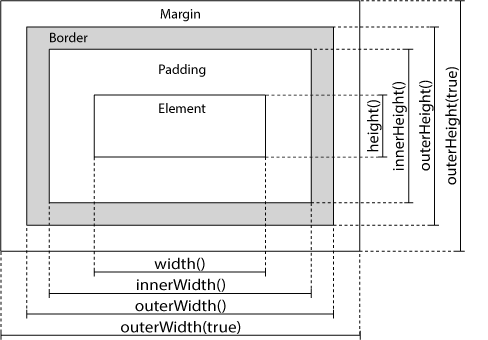
        Dimensions

        • width() 
        • height() 
        • innerWidth() 
        • innerHeight() 
        • outerWidth() 
        • outerHeight() 

        img

        1
        2
        
        $(document).width();      the width of the document (the HTML document) 
        $(window).height();     the height of window (the browser viewport)
        

        set the width and height of a specified <div> element:

        1
        
        $("#div1").width(500).height(500);
        

        jQuery Traversing

        Ancestors

        • parent() method returns the direct parent element of the selected element.

        • parents() method returns all ancestor elements of the selected element.

          1
          2
          
          // returns all ancestors of all <span> elements that are <ul> elements
          $("span").parents("ul");
          
        • parentsUntil() method returns all ancestor elements between two given arguments.

          1
          2
          
          // returns all ancestor elements between a <span> and a <div> element.
          $("span").parentsUntil("div");
          

        Descendants

        • children() This method only traverse a single level down the DOM tree.

          1
          2
          3
          4
          
          // returns all direct children of the selected element.
          $("div").children(); 
          // returns all <p> elements with the class name "first", that are direct children of <div>.
          $("div").children("p.first");
          
        • find() returns descendant elements of the selected element,

          1
          2
          
          $("div").find("span");
          $("div").find("*");   // returns all descendants
          

        Siblings

        • siblings()
        • next()
        • nextAll()
        • nextUntil()
        • prev()
        • prevAll()
        • prevUntil()

        jQuery AJAX

        • Ajax 的概念

        • 浏览器发送 Ajax 的原理和代码实现

        • Ajax 与 HTTP 相关的知识

          • HTTP 方法
          • 缓存
          • 跨域请求(CORS)
        • Ajax 上传文件

        • 同步和异步 Ajax